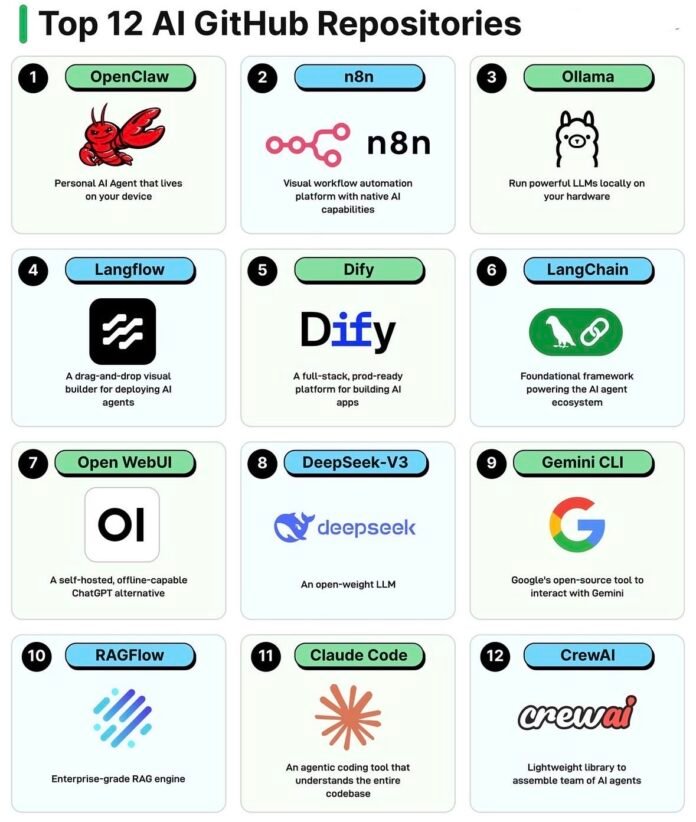
AI is no longer just about chatbots and simple prompts. It has evolved into a complete ecosystem where you can build intelligent applications, automate complex workflows, and even create teams of AI agents that collaborate like humans. But with so many tools emerging, it becomes difficult to know what actually matters. In this guide, we break down Top 12 AI GitHub Repositories that are shaping how developers and businesses build, scale, and operate with AI in 2026. Whether you are just starting or looking to level up your systems, this is the stack you need to understand.
1) 🦞OpenClaw: Personal AI Agents That Live on Your Device
Why Local AI Agents Are Becoming a Big Deal
Over the past few years, most AI tools have followed a simple pattern you send data to the cloud, and intelligence comes back.
But that model is slowly being challenged.
A new category of tools is emerging where AI doesn’t live on someone else’s servers it lives with you. OpenClaw sits right at the center of this shift.
Instead of being just another chatbot or API-based assistant, OpenClaw represents something far more powerful:
👉 A self-contained AI agent that operates directly on your machine, capable of executing tasks, remembering context, and interacting with your system like a real assistant.
This isn’t just convenience it’s a fundamental shift toward ownership, privacy, and autonomy in AI.
⚙️ How OpenClaw Actually Works (Behind the Scenes)
At its core, OpenClaw is built around the idea of an agent loop:
- Understand the task → Interprets your input using an LLM
- Plan actions → Breaks the task into smaller executable steps
- Use tools → Interacts with files, system commands, or APIs
- Observe results → Evaluates what happened
- Iterate → Improves until the task is complete
What makes it powerful is that this entire loop runs locally, meaning:
- No external API calls are required (if configured locally)
- No data leaves your system
- Execution is immediate and controllable
In simple terms, OpenClaw behaves less like a chatbot and more like a junior digital operator sitting inside your computer.
🔑 Core Features (Explained Deeply)
1. 🏠 Fully Local Execution (Privacy-First by Design)
Unlike cloud-based AI tools, OpenClaw can run entirely on your machine using local models.
This means:
- Sensitive files never leave your system
- No dependency on external servers
- Ideal for regulated industries (finance, healthcare, enterprise IT)
👉 This is not just a feature it’s a strategic advantage in a world concerned with data security.
2. 🤖 Task Automation Beyond Chat
OpenClaw doesn’t just “respond” — it acts.
It can:
- Navigate files and folders
- Execute terminal commands
- Automate repetitive workflows
- Perform multi-step tasks autonomously
Example:
Instead of asking “How do I organize my files?”
You can say → “Clean and organize my downloads folder by file type.”
3. 🧠 Memory & Context Awareness
One of the biggest limitations of traditional tools is lack of continuity.
OpenClaw introduces:
- Persistent memory
- Context retention across tasks
- Ability to build on previous actions
👉 Over time, it becomes more aligned with how you work, not just what you ask.
4. 🧰 Tool Integration System
OpenClaw can interact with:
- Local file systems
- External APIs
- Scripts and custom tools
This makes it extensible — you’re not limited to built-in capabilities.
👉 Think of it as an AI that can pick up new tools like a human learns new skills.
💡 Real-World Use Cases (Where It Actually Shines)
🧑💻 Personal Productivity Engine
- Automating file organization
- Managing notes or documents
- Running daily workflows
🌐 Offline AI Workflows
- Useful in low-connectivity environments
- Ideal for privacy-sensitive tasks
- No reliance on cloud APIs
🏢 Enterprise & Secure Environments
- Internal knowledge processing
- Sensitive data automation
- Compliance-heavy industries
⚡ Developer Companion
- Run scripts
- Debug workflows
- Automate dev environments
👍 Advantages That Make OpenClaw Stand Out
💸 Zero API Dependency
Once set up, you don’t pay per request — a huge win for heavy users.
🔐 Complete Data Ownership
Everything stays with you. No logs, no tracking, no external storage.
🌍 Works Without Internet
This is critical for:
- Remote environments
- Secure systems
- Always-on automation
👎 Limitations You Should Know
🖥️ Hardware Constraints
Performance depends on your machine:
- Better GPU = better results
- Low-end systems may struggle
⚙️ Setup Isn’t Beginner-Friendly
Unlike plug-and-play SaaS tools:
- Requires installation
- Needs configuration
- Some technical familiarity helps
🧠 Still Evolving
The ecosystem is growing, but not as mature as cloud AI platforms yet.
🆚 OpenClaw vs Cloud AI Agents (Quick Perspective)
| Factor | OpenClaw | Cloud AI (ChatGPT, etc.) |
|---|---|---|
| Privacy | ✅ Full control | ❌ Data leaves system |
| Cost | ✅ One-time setup | ❌ Pay per usage |
| Speed | ⚡ Fast locally | 🌐 Depends on API |
| Setup | ❌ Complex | ✅ Easy |
| Control | ✅ High | ❌ Limited |
🚀 When Should You Use OpenClaw?
OpenClaw is not for everyone — and that’s exactly why it’s powerful.
You should consider it if:
- You care about data privacy and control
- You want to automate tasks locally
- You’re building custom AI workflows
- You prefer ownership over convenience
👉 In short:
If you want an AI that works for you, not through a platform, OpenClaw is worth exploring.
🔚 Final Takeaway
OpenClaw represents a bigger shift happening in AI right now:
From:
“Using AI tools”
To:
“Owning your own AI system”
As AI becomes more integrated into daily workflows, tools like OpenClaw will define the next phase, where intelligence is not rented, but embedded.
2) 🔄n8n: Backbone of Modern AI-Powered Automation
Why Automation Needs an Upgrade
Automation tools have been around for years, helping businesses connect apps and reduce manual work. But most traditional platforms come with limitations. They are either too rigid, too expensive at scale, or too dependent on third-party control.
This is where n8n stands out.
Instead of being just another automation tool, n8n introduces a new approach where you are in control of your workflows, your data, and your logic. It blends the simplicity of visual automation with the flexibility of real development, making it one of the most powerful tools in the modern AI stack.
⚙️ How n8n Works Behind the Scenes
At its core, n8n operates on a node-based workflow system.
Each workflow is made up of nodes where:
- One node triggers an event
- Other nodes process or transform data
- Final nodes execute actions across different platforms
What makes it powerful is that you can mix:
- Pre-built integrations
- Custom logic
- AI-driven decision making
This means your workflows are not just automated, they are intelligent and adaptive.
For example, instead of simply sending a follow-up email, n8n can:
- Analyze user behavior
- Decide the best response using AI
- Trigger personalized communication
This turns automation into decision-driven systems rather than fixed sequences.
🔑 Core Features Explained in Depth
🎨 Visual Workflow Builder That Still Feels Powerful
n8n offers a drag and drop interface, but unlike simpler tools, it does not limit what you can do.
You can:
- Build complex multi-step workflows
- Add conditions and branching logic
- Handle data transformations visually
It gives you the clarity of visual tools with the depth of coding logic.
🔗 Extensive Integrations Across Tools
n8n connects with hundreds of platforms including CRMs, email systems, databases, and APIs.
More importantly:
- You are not limited to built-in integrations
- You can connect any API manually
- Custom nodes can be created
This removes the dependency on platform restrictions.
🤖 Native AI Integration
One of the biggest strengths of n8n is how naturally AI fits into workflows.
You can:
- Use LLMs to generate responses
- Classify leads automatically
- Summarize or enrich data
- Build decision-making logic into flows
This allows you to move from basic automation to AI-powered operations.
🏠 Self Hosting and Full Control
Unlike many automation tools, n8n can be hosted on your own server.
This gives you:
- Complete ownership of data
- Better security
- Freedom from pricing limits
For businesses handling sensitive data, this is a major advantage.
💡 Real World Use Cases That Actually Deliver Value
📈 Lead Management and Nurturing
n8n can automate the entire lead journey:
- Capture leads from multiple sources
- Segment based on behavior
- Send personalized follow-ups
- Notify sales teams
This is especially powerful for structured funnels like TMBA where timing and personalization matter.
📧 Email and CRM Automation
Instead of manually updating systems:
- Sync leads across platforms
- Trigger emails based on actions
- Maintain clean and updated CRM data
This reduces operational friction and improves response speed.
🧠 AI Driven Workflows
You can build flows where AI plays a central role:
- Score leads automatically
- Generate responses
- Analyze conversations
- Route tasks intelligently
This transforms workflows into systems that think before they act.
🔄 Internal Business Automation
From reporting to notifications:
- Generate daily reports
- Monitor key metrics
- Automate repetitive admin tasks
This frees up teams to focus on higher-value work.
👍 Advantages That Make n8n Stand Out
🔓 Complete Flexibility
You are not locked into predefined templates. You can design workflows exactly the way your business operates.
💰 Cost Efficiency at Scale
Unlike tools that charge per task or per execution, n8n becomes significantly more affordable as your usage grows.
🧠 Combines Automation with Intelligence
Most tools automate actions. n8n allows you to automate decisions.
🔐 Data Ownership
With self hosting, your workflows and data remain fully under your control.
👎 Limitations You Should Consider
📚 Learning Curve
n8n is powerful, but it requires some understanding of logic, APIs, and workflows to fully unlock its potential.
🎨 Interface Can Feel Less Polished
Compared to tools like Zapier, the interface is functional but not as refined. However, this is often a trade-off for flexibility.
⚙️ Requires Setup Effort
If you choose self hosting, you need to manage deployment and maintenance, which may require technical support.
🆚 n8n vs Traditional Automation Tools
| Factor | n8n | Traditional Tools |
|---|---|---|
| Flexibility | High | Limited |
| AI Integration | Native and customizable | Basic |
| Pricing | Scales well | Expensive at scale |
| Control | Full ownership | Platform dependent |
| Customization | Deep | Restricted |
🚀 When Should You Use n8n
n8n becomes extremely valuable when your workflows start getting complex and critical.
You should use it if:
- You want to automate multi-step business processes
- You need AI inside your workflows
- You are scaling lead generation or marketing funnels
- You want control over data and execution
👉 In simple terms
n8n is ideal when you move from basic automation to building systems that run your operations
🔚 Final Takeaway
n8n is not just an automation tool. It is a platform where workflows evolve into intelligent systems.
As businesses move toward AI-driven operations, tools like n8n will become central to how work gets done.
Instead of managing tasks manually or relying on rigid tools, you can design workflows that:
- Adapt
- Learn
- Execute
And most importantly, scale with your ambition.
3) 🦙Ollama: Running Powerful AI Models Directly on Your Machine
The Shift Toward Local AI
For most people, using AI today means relying on cloud platforms. You send a request, wait for a response, and depend on external servers to do the heavy lifting.
But what if you could run that same intelligence directly on your own machine?
That’s exactly what Ollama enables.
Ollama simplifies one of the most complex parts of AI adoption which is running large language models locally. Instead of dealing with complicated setups, dependencies, and configurations, it reduces everything to a simple command.
The result is a tool that brings powerful AI capabilities closer to the user, making local AI practical, accessible, and efficient.
⚙️ How Ollama Works Behind the Scenes
Ollama acts as a lightweight runtime environment for large language models.
When you run a command, Ollama:
- Downloads and manages the selected model
- Optimizes it for local execution
- Runs it through a local inference engine
- Exposes it via a simple interface or API
This means you are not just running a model, you are interacting with a locally hosted AI system that behaves similarly to cloud-based tools but without external dependency.
It abstracts away the complexity so you can focus on using AI rather than setting it up.
🔑 Core Features Explained in Depth
🖥️ Effortless Local Model Execution
One of the biggest barriers in AI has been setup complexity. Ollama removes that completely.
With a single command, you can:
- Download a model
- Run it instantly
- Start interacting through terminal or API
This simplicity is what makes Ollama stand out from traditional model deployment approaches.
📚 Built-in Model Library
Ollama provides access to a growing collection of models such as:
- LLaMA family
- Mistral
- Other optimized open models
Instead of searching and configuring models manually, you can access them in a structured and ready-to-use format.
This makes experimentation fast and accessible.
🔌 Local API Server
Ollama does not just run models, it turns them into services.
It provides:
- A local API endpoint
- Integration with applications
- Support for building AI-powered tools
This means you can use Ollama as the backend for:
- Chat applications
- Internal tools
- Custom AI workflows
⚡ Optimized Performance for Local Hardware
Ollama is designed to make the most out of your system.
It handles:
- Model optimization
- Efficient resource usage
- Smooth inference
While performance depends on your hardware, Ollama ensures you get the best possible output from what you have.
💡 Real World Use Cases That Matter
🔐 Private AI Assistant
You can build a ChatGPT-like experience that runs entirely on your system.
No data sharing. No tracking. Full control.
🛠️ Local AI Applications
Developers can build applications powered by local models:
- Internal tools
- Document processors
- AI assistants for teams
🧪 Testing and Experimentation
Before deploying to production, developers can:
- Test prompts
- Compare models
- Experiment with workflows
This reduces cost and speeds up development cycles.
🌍 Offline AI Capabilities
Ollama enables AI usage even without internet access.
This is useful in:
- Secure environments
- Remote locations
- Systems with restricted connectivity
👍 Advantages That Make Ollama Powerful
⚡ Extremely Simple to Use
What used to take hours of setup can now be done in seconds.
🔐 Complete Privacy
All processing happens locally, which means your data never leaves your machine.
💸 No API Costs
Once the model is downloaded, you can use it freely without worrying about usage charges.
🧠 Developer Friendly
With API support and local control, developers can build and test without restrictions.
👎 Limitations You Should Understand
🖥️ Hardware Dependency
Performance depends heavily on your system:
- More RAM improves handling
- GPU significantly boosts speed
Lower-end systems may struggle with larger models.
⚡ Limited by Local Performance
Unlike cloud platforms that use massive infrastructure, local models are constrained by your machine’s capabilities.
This can affect:
- Speed
- Response quality
- Ability to run larger models
📉 Model Ecosystem Still Growing
While Ollama supports strong models, the ecosystem is still evolving compared to large cloud providers.
🆚 Ollama vs Cloud AI Platforms
| Factor | Ollama | Cloud AI |
|---|---|---|
| Privacy | Full control | Data shared externally |
| Cost | One-time resource usage | Ongoing API costs |
| Setup | Simple but local | Instant but dependent |
| Performance | Hardware-based | High-scale infrastructure |
| Control | High | Limited |
🚀 When Should You Use Ollama
Ollama becomes valuable when control and independence matter more than convenience.
You should use it if:
- You want to run AI without relying on external APIs
- You care about privacy and data ownership
- You are building local or internal AI tools
- You want to experiment without incurring costs
👉 In simple terms
Ollama is ideal when you want AI that runs with you, not somewhere else
🔚 Final Takeaway
Ollama represents an important step in the evolution of AI.
It brings powerful models out of the cloud and into the hands of individuals and teams, making AI more accessible, private, and controllable.
As the ecosystem matures, tools like Ollama will play a key role in shaping a future where AI is not just consumed, but owned and integrated into everyday systems.0
4) 🧩Langflow: Turning AI Workflows into Visual Experiences
Making AI Development Less Intimidating
Building AI applications often feels overwhelming, especially when it involves chaining prompts, managing logic, and integrating multiple components.
For many people, the biggest barrier is not the idea, it is the complexity of execution.
Langflow changes that.
Instead of writing long blocks of code, Langflow allows you to design AI workflows visually, making the entire process more intuitive and accessible. It acts as a bridge between powerful AI frameworks and real-world usability, helping both beginners and experienced builders move faster.
⚙️ How Langflow Works Behind the Scenes
Langflow is built as a visual interface on top of LangChain, one of the most widely used frameworks for building AI applications.
Under the hood:
- Each block represents a function or component
- Connections define how data flows between them
- Prompts, memory, and tools are linked visually
Instead of thinking in terms of code, you think in terms of flows and interactions.
This makes it easier to understand how your AI system behaves, debug issues, and iterate quickly.
🔑 Core Features Explained in Depth
🎨 Drag and Drop Workflow Builder
Langflow allows you to create AI pipelines by simply connecting components.
You can:
- Build chains step by step
- Add logic without writing code
- Visualize the entire workflow in one place
This makes complex systems feel manageable and structured.
✍️ Visual Prompt Engineering
Prompt design is a critical part of AI development, and Langflow makes it easier to experiment.
Instead of editing text in isolation, you can:
- Modify prompts in context
- See how they connect with other steps
- Test variations quickly
This turns prompt engineering into a visual and iterative process rather than trial and error.
🔌 API Export for Real Applications
Once your workflow is ready, Langflow allows you to export it as an API.
This means:
- Your prototype can be turned into a usable backend
- You can integrate it with apps or websites
- You can move from idea to implementation faster
It bridges the gap between experimentation and real usage.
🔍 Workflow Transparency and Debugging
One underrated strength of Langflow is visibility.
You can:
- See how data moves through each step
- Identify where things break
- Adjust logic without digging through code
This clarity is extremely valuable when working with complex AI pipelines.
💡 Real World Use Cases That Make Sense
🚀 Rapid Prototyping of AI Applications
Langflow is perfect for testing ideas quickly:
- Chatbots
- AI assistants
- Content generation workflows
You can go from concept to working prototype in a fraction of the time.
👩💼 Non Technical Users Building AI Tools
For people without deep coding experience:
- Create workflows visually
- Experiment without fear of breaking code
- Understand how AI systems work
This lowers the barrier to entry significantly.
🧠 Workflow Visualization for Teams
Even for technical teams:
- Explain systems visually
- Collaborate on architecture
- Align on logic before coding
It becomes a communication tool, not just a builder.
🧪 Experimentation and Learning
Langflow is ideal for:
- Learning how LLM pipelines work
- Testing different prompt strategies
- Exploring new AI ideas
It encourages exploration without heavy setup.
👍 Advantages That Make Langflow Valuable
🎯 Beginner Friendly by Design
It removes the intimidation of coding and replaces it with a visual approach that is easier to understand.
⚡ Speeds Up Iteration
Instead of rewriting code, you can adjust workflows instantly and see results faster.
👀 Clear Visibility of Logic
You always know what your system is doing and how each part connects.
🧠 Great Learning Tool
It helps you understand the structure of AI systems, not just use them.
👎 Limitations You Should Be Aware Of
🏗️ Not Built for Production Systems
Langflow is excellent for prototyping, but large scale applications often require more control and optimization.
⚙️ Limited Flexibility Compared to Code
While visual tools are convenient, they can become restrictive when you need deep customization.
📈 Scaling Challenges
As workflows grow more complex, managing them visually can become harder than handling them in code.
🆚 Langflow vs Coding Directly with Frameworks
| Factor | Langflow | Direct Coding |
|---|---|---|
| Ease of Use | High | Moderate to Low |
| Speed of Prototyping | Fast | Slower |
| Flexibility | Limited | High |
| Debugging | Visual | Code-based |
| Production Readiness | Low | High |
🚀 When Should You Use Langflow
Langflow is best used in the early stages of building AI systems.
You should use it if:
- You are learning how AI workflows operate
- You want to prototype ideas quickly
- You prefer visual building over coding
- You need to demonstrate concepts to a team
👉 In simple terms
Langflow is ideal when you want to think, experiment, and design before committing to full development
🔚 Final Takeaway
Langflow represents an important layer in the AI ecosystem.
It takes the complexity of frameworks like LangChain and turns them into something visual, interactive, and approachable. While it may not replace coding for production systems, it plays a crucial role in helping ideas take shape faster.
As AI development continues to grow, tools like Langflow will become essential for bridging the gap between imagination and implementation.
5)⚡Dify: From AI Idea to Production Ready Application in One Platform
The Missing Layer in AI Development
Building AI applications today often involves stitching together multiple tools. You need something for prompts, something for logic, something for deployment, and something for monitoring.
This fragmented approach slows everything down.
Dify solves this problem by bringing everything into a single platform.
Instead of juggling frameworks, APIs, and infrastructure, Dify allows you to design, deploy, and manage AI applications from one place. It is built for people who want to move beyond experimentation and actually launch working AI products.
⚙️ How Dify Works Behind the Scenes
Dify combines multiple layers of AI development into a unified system.
It handles:
- Prompt orchestration
- Data retrieval and context injection
- Application logic
- API exposure
- Usage tracking
This means you are not just building workflows, you are creating complete AI applications with backend capabilities included.
Unlike traditional frameworks where you assemble everything manually, Dify gives you a structured environment where each component is already integrated and optimized to work together.
🔑 Core Features Explained in Depth
✍️ Centralized Prompt Management
Prompts are at the heart of any AI application, and Dify treats them as first class components.
You can:
- Create and manage multiple prompts
- Version and refine them over time
- Test outputs in real scenarios
This makes prompt development more organized and scalable.
📚 Built In RAG Pipelines
Dify makes it easy to build applications that use your own data.
With Retrieval Augmented Generation, you can:
- Upload documents or datasets
- Enable AI to retrieve relevant context
- Generate responses grounded in real information
This is essential for building reliable and accurate AI systems.
🔌 Instant API Deployment
Once your application is ready, Dify allows you to deploy it as an API without additional setup.
This means:
- Your AI app can be integrated into websites or products
- Developers can connect to it easily
- You can go live much faster
It removes one of the biggest bottlenecks in AI development.
📊 Built In Analytics and Monitoring
Understanding how your AI performs is just as important as building it.
Dify provides:
- Usage insights
- Performance tracking
- Interaction analysis
This helps you improve your application over time based on real data.
💡 Real World Use Cases That Drive Impact
🚀 Building SaaS AI Products
Dify is ideal for launching AI based tools such as:
- Content generation platforms
- AI assistants
- Niche SaaS applications
You can go from idea to live product without building everything from scratch.
💬 Business Chatbots
Companies can create intelligent chatbots that:
- Answer customer queries
- Use internal knowledge
- Provide consistent responses
This improves both efficiency and user experience.
🏢 Internal AI Tools
Teams can build tools for:
- Knowledge retrieval
- Process automation
- Decision support
These tools can be tailored to specific business needs.
📈 Data Driven AI Applications
With RAG capabilities, Dify enables:
- Document based assistants
- Research tools
- Insight generation systems
This ensures outputs are grounded in real data rather than generic responses.
👍 Advantages That Make Dify Stand Out
🚀 Built for Production from Day One
Unlike many tools focused on experimentation, Dify is designed to support real world applications.
🎨 Clean and Structured Interface
The platform is intuitive, making it easier to manage complex systems without confusion.
🧩 All in One Architecture
You do not need separate tools for prompts, backend, and deployment. Everything works together seamlessly.
⚡ Faster Time to Market
By reducing technical overhead, Dify allows you to launch applications much quicker.
👎 Limitations You Should Consider
⚙️ Less Flexibility Than Raw Frameworks
Since Dify provides a structured environment, it may not allow the same level of customization as building everything from scratch.
🧠 Abstraction Can Be Limiting
Advanced users might find certain configurations restricted compared to direct coding approaches.
📈 Dependency on Platform Design
You are working within Dify’s ecosystem, which means adapting to its structure rather than building entirely your own.
🆚 Dify vs Traditional AI Development Approach
| Factor | Dify | Traditional Setup |
|---|---|---|
| Setup Time | Fast | Slow |
| Complexity | Low to Moderate | High |
| Customization | Moderate | High |
| Deployment | Built in | Manual |
| Maintenance | Simplified | Requires effort |
🚀 When Should You Use Dify
Dify becomes extremely valuable when your goal is to move quickly from concept to execution.
You should use it if:
- You want to launch AI applications without heavy engineering
- You need a structured and reliable environment
- You are building SaaS or business tools
- You want to reduce development time and complexity
👉 In simple terms
Dify is ideal when you want to build and launch AI products without getting stuck in infrastructure
🔚 Final Takeaway
Dify represents a shift toward simplifying AI development at scale.
It removes the friction between idea and execution by combining essential components into a single platform. While it may not replace fully custom systems, it dramatically lowers the barrier to building production ready AI applications.
As the demand for AI powered products continues to grow, platforms like Dify will play a key role in enabling faster innovation with fewer technical hurdles.
6) 🔗LangChain: The Engine Behind Modern AI Applications
🧠 Introduction: Where AI Becomes Systems, Not Just Responses
Most people experience AI through simple interactions. You ask a question, you get an answer.
But real-world AI applications are far more complex.
They need to:
- Remember context
- Access external data
- Make decisions
- Use tools
- Execute multi-step tasks
This is where LangChain comes in.
LangChain is not just a tool, it is a framework designed to turn language models into fully functional systems. It provides the building blocks needed to move from isolated prompts to structured, intelligent applications.
⚙️ How LangChain Works Behind the Scenes
At its core, LangChain introduces the concept of chaining together components to create intelligent workflows.
Instead of relying on a single prompt, it allows you to combine:
- Language models
- Data sources
- Memory layers
- External tools
These components work together in a sequence where:
- Input is processed
- Context is added
- Decisions are made
- Actions are executed
This transforms AI from a passive responder into an active system capable of reasoning and execution.
🔑 Core Features Explained in Depth
🔗 Chains That Connect Logic and Language
Chains are the foundation of LangChain.
They allow you to:
- Break complex tasks into smaller steps
- Pass outputs from one step to another
- Build structured workflows
Instead of writing one large prompt, you create a flow of intelligence.
🤖 Agents That Make Decisions
Agents take things a step further.
They can:
- Decide which tool to use
- Choose the next action dynamically
- Adapt based on results
This means your AI is no longer following a fixed script. It is making decisions in real time.
🧠 Memory for Context Awareness
LangChain introduces memory systems that allow applications to retain context.
This enables:
- Multi-turn conversations
- Personalized interactions
- Continuity across sessions
Without memory, AI resets every time. With memory, it becomes context-aware and evolving.
🔌 Tool Integration for Real World Actions
LangChain can connect with:
- APIs
- Databases
- File systems
- External services
This allows AI to:
- Fetch real-time data
- Perform actions
- Interact with external systems
It bridges the gap between understanding and execution.
📚 Retrieval Augmented Generation Support
LangChain makes it easier to build systems that use external knowledge.
With RAG, you can:
- Connect documents or databases
- Retrieve relevant information
- Generate accurate, grounded responses
This reduces hallucination and improves reliability.
💡 Real World Use Cases That Show Its Power
🤖 Intelligent Chatbots
Build chatbots that:
- Remember conversations
- Access knowledge bases
- Provide contextual responses
🧑💻 AI Copilots
Create assistants that help with:
- Coding
- Research
- Content generation
These systems go beyond answering questions and actively assist in tasks.
📊 Data Driven Applications
LangChain enables tools that:
- Analyze documents
- Extract insights
- Answer questions based on data
This is especially useful for businesses dealing with large datasets.
⚙️ Autonomous Agents
You can build systems that:
- Plan tasks
- Execute actions
- Iterate toward goals
This is where AI starts behaving like a digital operator rather than a tool.
👍 Advantages That Make LangChain Essential
🧩 Highly Modular and Flexible
You can customize every part of the system based on your needs.
🌍 Massive Ecosystem
LangChain has strong community support, integrations, and continuous development.
🧠 Enables Complex AI Systems
It allows you to build applications that go far beyond simple prompts.
🔄 Adaptable Across Use Cases
From chatbots to enterprise tools, LangChain can be shaped to fit different requirements.
👎 Limitations You Should Be Aware Of
📚 Steep Learning Curve
Understanding how all components work together takes time and practice.
🔄 Frequent Updates
The ecosystem evolves quickly, which can lead to breaking changes or the need for constant updates.
⚙️ Requires Engineering Effort
Unlike no-code tools, LangChain often requires coding and system design knowledge.
🆚 LangChain vs No Code AI Platforms
| Factor | LangChain | No Code Platforms |
|---|---|---|
| Flexibility | Very High | Limited |
| Ease of Use | Moderate to Low | High |
| Customization | Deep | Restricted |
| Speed of Setup | Slower | Faster |
| Production Control | Full | Platform dependent |
🚀 When Should You Use LangChain
LangChain is best suited for building serious, scalable AI systems.
You should use it if:
- You need full control over your AI architecture
- You are building complex workflows or agents
- You want to integrate multiple data sources and tools
- You are developing production level AI applications
👉 In simple terms
LangChain is ideal when you move from using AI tools to engineering AI systems
🔚 Final Takeaway
LangChain is one of the most important frameworks in the modern AI ecosystem.
It provides the structure needed to turn powerful language models into real applications that can reason, act, and evolve. While it requires effort to master, the level of control and capability it offers is unmatched.
As AI continues to move beyond simple interactions, frameworks like LangChain will define how intelligent systems are built and deployed.
7) 💬Open WebUI: Bringing a ChatGPT Experience to Your Own AI Models
The Missing Interface for Local AI
Running powerful AI models locally is becoming easier with tools like Ollama. But there is still one major gap.
Most local setups lack a clean, intuitive way to interact with those models.
This is where Open WebUI comes in.
Open WebUI provides a familiar, ChatGPT-like interface that sits on top of your local AI models. Instead of interacting through terminals or raw APIs, it gives you a polished conversational experience, making local AI feel accessible and usable.
⚙️ How Open WebUI Works Behind the Scenes
Open WebUI acts as a frontend layer that connects directly to local model runtimes such as Ollama.
Here is how it functions:
- The backend model processes requests locally
- Open WebUI handles the user interface
- Communication happens through local APIs
- Conversations are displayed in a structured chat format
This separation allows you to combine:
- Powerful local AI models
- A clean and user-friendly interface
The result is a system that feels like a cloud AI product but runs entirely on your own machine.
🔑 Core Features Explained in Depth
💬 ChatGPT Like Interface
Open WebUI replicates the experience most users are already familiar with.
You get:
- Clean chat layout
- Conversation history
- Easy interaction flow
This removes the friction of working with command line tools and makes AI accessible to a wider audience.
🔄 Multi Model Support
Instead of being tied to a single model, Open WebUI allows you to switch between different models.
This means you can:
- Compare outputs
- Use different models for different tasks
- Experiment without changing setups
It adds flexibility without complicating the user experience.
🌐 Fully Offline Capability
When connected to local runtimes, Open WebUI works without internet access.
This enables:
- Private conversations
- Secure environments
- Reliable access without network dependency
It is especially useful for users who prioritize data security.
🧩 Seamless Integration with Local AI Stack
Open WebUI fits naturally into a local AI ecosystem.
It can work alongside:
- Local LLM runtimes
- Self hosted tools
- Internal applications
This makes it a central interface for managing and interacting with your AI systems.
💡 Real World Use Cases That Matter
🏢 Internal Company Chatbots
Organizations can deploy private chat interfaces for:
- Knowledge access
- Internal support
- Document based queries
All without exposing sensitive data to external services.
🧑💻 Personal AI Dashboard
Individuals can create a centralized space to:
- Interact with multiple models
- Manage conversations
- Experiment with prompts
This turns local AI into a daily productivity tool.
🔐 Secure AI Environments
For industries where data privacy is critical:
- Financial institutions
- Healthcare systems
- Enterprise IT
Open WebUI provides a safe way to use AI without external risk.
🧪 Testing and Experimentation
Developers can:
- Test model responses
- Compare performance
- Iterate quickly
The interface makes experimentation faster and more intuitive.
👍 Advantages That Make Open WebUI Valuable
🎨 Clean and Familiar User Experience
Users do not need to learn new systems. It feels natural from the first interaction.
🔐 Works with Local Models
It integrates seamlessly with tools like Ollama, enabling a fully self hosted AI setup.
🌍 Offline and Private
No internet required means complete control over data and interactions.
🧠 Simplifies Complex Systems
It hides backend complexity and presents a simple interface for everyday use.
👎 Limitations You Should Be Aware Of
⚙️ Dependent on Backend Models
The quality of responses depends entirely on the model you are running.
If the model is weak, the experience will reflect that.
🖥️ Requires Local Setup
You need to have a local AI runtime already configured for it to function properly.
📈 Limited Without Ecosystem Integration
On its own, Open WebUI is just an interface. Its full value comes when combined with other tools.
🆚 Open WebUI vs Cloud Chat Interfaces
| Factor | Open WebUI | Cloud Interfaces |
|---|---|---|
| Privacy | Full control | Data shared externally |
| Cost | No usage fees | Pay per usage |
| Setup | Requires configuration | Instant access |
| Flexibility | High with local stack | Limited |
| Dependency | Local system | External servers |
🚀 When Should You Use Open WebUI
Open WebUI is most useful when you already have or plan to build a local AI setup.
You should use it if:
- You want a ChatGPT like experience for local models
- You care about privacy and data ownership
- You are building internal AI tools
- You need a clean interface for interacting with AI
👉 In simple terms
Open WebUI is ideal when you want to turn your local AI into a usable, everyday experience
🔚 Final Takeaway
Open WebUI plays a crucial role in the local AI ecosystem.
While tools like Ollama provide the intelligence, Open WebUI provides the experience. Together, they create a system where AI is not only powerful but also accessible and easy to use.
As more users move toward self hosted AI, interfaces like Open WebUI will become essential in bridging the gap between technical capability and real world usability.
8) 🧠DeepSeek V3: High Performance AI Without the Premium Price Tag
The Rise of Cost Efficient Intelligence
For a long time, access to high quality AI models has come at a cost. The most powerful systems are often locked behind expensive APIs, making it difficult for startups, developers, and businesses to scale without worrying about usage bills.
This is where DeepSeek V3 changes the equation.
DeepSeek has introduced a new generation of models that focus on one critical idea
delivering strong performance without the heavy cost structure
DeepSeek V3 is part of a broader movement toward open and efficient AI, where capability is no longer limited to those who can afford premium infrastructure.
⚙️ How DeepSeek V3 Works Behind the Scenes
DeepSeek V3 is built as an open weight large language model, which means its parameters are accessible and can be deployed in different environments.
Under the hood, it focuses on:
- Optimized architecture for efficient computation
- Strong reasoning capabilities across tasks
- Scalable inference without excessive resource consumption
This allows it to deliver performance that competes with top tier models while maintaining lower operational costs.
In practical terms, it gives developers and businesses the ability to run advanced AI systems without being locked into expensive ecosystems.
🔑 Core Features Explained in Depth
🧠 Strong Reasoning Capabilities
DeepSeek V3 is designed to handle tasks that require logical thinking and structured responses.
It performs well in:
- Problem solving
- Code generation
- Analytical tasks
This makes it suitable for applications where accuracy and reasoning matter more than just fluent text.
🔓 Open Weight Accessibility
Unlike closed models, DeepSeek provides access to its model weights.
This means:
- You can deploy it in your own environment
- You are not restricted by API limitations
- You have greater control over customization
This level of openness is a major advantage for developers building independent systems.
⚡ Efficient Inference
DeepSeek V3 is optimized to deliver strong outputs without requiring excessive computational resources.
This results in:
- Faster response times
- Lower infrastructure costs
- Better scalability for applications
Efficiency is what makes it practical for real world usage at scale.
💡 Real World Use Cases That Drive Value
🧑💻 AI Powered Coding Assistants
DeepSeek V3 can be used to:
- Generate code
- Debug issues
- Explain complex logic
Its reasoning ability makes it particularly useful for development workflows.
🚀 Building AI SaaS Products
Startups can leverage DeepSeek to:
- Build AI driven platforms
- Offer intelligent features
- Scale without high API costs
This lowers the barrier to launching AI based businesses.
🔬 Research and Analysis Tools
For research heavy tasks, DeepSeek can:
- Summarize complex information
- Analyze data
- Provide structured insights
This makes it valuable for both academic and business research.
🧠 Internal AI Systems
Companies can integrate DeepSeek into:
- Knowledge systems
- Decision support tools
- Internal automation workflows
All while maintaining control over data and costs.
👍 Advantages That Make DeepSeek V3 Stand Out
💸 Cost Efficiency at Scale
One of the biggest advantages is the ability to run powerful AI without paying per request.
📊 Strong Benchmark Performance
DeepSeek models have shown competitive performance across various benchmarks, especially in reasoning and coding tasks.
🔐 Greater Control and Flexibility
With open weights, you can deploy and adapt the model according to your needs.
⚡ Balanced Performance and Efficiency
It delivers a strong combination of capability and resource optimization.
👎 Limitations You Should Be Aware Of
📈 Ecosystem Still Growing
Compared to more established platforms, tooling and community support are still evolving.
⚙️ Requires Setup and Infrastructure
Using open models often involves:
- Deployment setup
- Resource management
- Technical understanding
This can be a barrier for non technical users.
🔄 Rapidly Changing Landscape
As the AI space evolves quickly, newer models and improvements are constantly emerging.
🆚 DeepSeek V3 vs Premium Closed Models
| Factor | DeepSeek V3 | Closed Models |
|---|---|---|
| Cost | Low | High |
| Access | Open weights | Restricted |
| Flexibility | High | Limited |
| Setup | Requires effort | Instant |
| Control | Full | Platform dependent |
🚀 When Should You Use DeepSeek V3
DeepSeek V3 is most valuable when you are balancing performance with cost and control.
You should use it if:
- You want high quality AI without ongoing API expenses
- You are building scalable AI applications
- You need strong reasoning capabilities
- You prefer open and flexible systems
👉 In simple terms
DeepSeek V3 is ideal when you want powerful AI that you can afford to scale
🔚 Final Takeaway
DeepSeek V3 represents a significant shift in how AI is accessed and deployed.
It proves that high performance does not always have to come with high costs. By focusing on efficiency, openness, and strong reasoning, it opens the door for more developers and businesses to build advanced AI systems without being constrained by pricing.
As the ecosystem continues to mature, models like DeepSeek V3 will play a key role in shaping a more accessible and competitive AI landscape.
9) 🖥️Gemini CLI: Bringing AI Power Directly Into Your Terminal
Where Developers Actually Work
Most AI tools today are designed around interfaces like chat windows or dashboards. While these are useful, they do not always fit naturally into a developer’s workflow.
Developers live in the terminal.
This is where code is written, scripts are executed, and systems are managed. Switching between tools can slow things down and break focus.
That is exactly the gap Gemini CLI is designed to fill.
Built by Google, Gemini CLI allows you to interact with advanced AI models directly from your terminal, turning it into a powerful, AI-enabled workspace.
⚙️ How Gemini CLI Works Behind the Scenes
Gemini CLI acts as a command line interface that connects your terminal to Gemini models.
Here is how it functions:
- You input commands or prompts directly in the terminal
- The CLI sends requests to the model
- Responses are returned instantly in the same environment
- Outputs can be piped into scripts or workflows
This creates a seamless loop where AI becomes part of your existing development process rather than a separate tool.
Instead of opening a browser and typing prompts, you can integrate AI directly into your command flow.
🔑 Core Features Explained in Depth
⌨️ Terminal Based AI Interaction
Gemini CLI allows you to communicate with AI without leaving the command line.
You can:
- Ask questions
- Generate code
- Analyze outputs
All within the same environment where you build and run applications.
This keeps your workflow uninterrupted and efficient.
🔄 Script Integration and Automation
One of the biggest advantages is the ability to integrate AI into scripts.
You can:
- Automate repetitive tasks
- Generate dynamic outputs
- Combine AI responses with shell commands
This transforms simple scripts into intelligent automation systems.
🧑💻 Designed for Developer Workflows
Gemini CLI fits naturally into development environments.
It supports:
- Fast iteration
- Command chaining
- Integration with existing tools
Instead of adapting your workflow to AI, the tool adapts to how developers already work.
⚡ Lightweight and Fast Execution
Since it runs in the terminal, Gemini CLI is:
- Minimal in resource usage
- Quick to execute
- Free from heavy interfaces
This makes it ideal for developers who value speed and efficiency.
💡 Real World Use Cases That Actually Matter
🚀 Developer Productivity Boost
Developers can use Gemini CLI to:
- Generate code snippets
- Debug issues
- Explain complex logic
This reduces time spent on repetitive or time-consuming tasks.
⚙️ Intelligent Automation Scripts
By integrating AI into scripts, you can:
- Process data dynamically
- Generate outputs based on context
- Build smarter automation pipelines
This goes beyond static scripting into adaptive workflows.
🧪 CLI Based AI Tasks
For users comfortable with the terminal:
- Run quick AI queries
- Analyze logs or outputs
- Perform on-the-fly transformations
Everything stays within the command line environment.
🔄 DevOps and System Operations
Gemini CLI can assist in:
- Writing configuration files
- Troubleshooting systems
- Automating deployment tasks
This adds intelligence to operational workflows.
👍 Advantages That Make Gemini CLI Stand Out
⚡ Fast and Lightweight
No heavy interface, no unnecessary overhead. Just direct interaction with AI.
🧑💻 Built for Developers
It integrates naturally into coding and scripting environments.
🔄 Enhances Existing Workflows
Instead of replacing tools, it enhances what developers already use.
🧠 Enables Intelligent Automation
Scripts become smarter, more adaptive, and context aware.
👎 Limitations You Should Be Aware Of
📚 Not Beginner Friendly
Users unfamiliar with the command line may find it difficult to use effectively.
🖥️ Requires Technical Comfort
To fully leverage its capabilities, you need to be comfortable with:
- Terminal commands
- Scripting
- Development workflows
⚙️ Limited Without Integration
On its own, it is powerful, but its real strength comes when integrated into larger workflows.
🆚 Gemini CLI vs GUI Based AI Tools
| Factor | Gemini CLI | GUI Tools |
|---|---|---|
| Ease of Use | Moderate to Low | High |
| Speed | High | Moderate |
| Flexibility | High | Limited |
| Workflow Integration | Deep | Surface level |
| Learning Curve | Steep | Low |
🚀 When Should You Use Gemini CLI
Gemini CLI is best suited for users who are deeply involved in technical workflows.
You should use it if:
- You spend most of your time in the terminal
- You want to integrate AI into scripts and automation
- You are a developer looking for faster workflows
- You prefer efficiency over visual interfaces
👉 In simple terms
Gemini CLI is ideal when you want AI to work exactly where you work
🔚 Final Takeaway
Gemini CLI represents a shift toward embedding AI directly into developer environments.
Instead of treating AI as a separate tool, it becomes part of the command line itself. This approach reduces friction, improves speed, and opens up new possibilities for intelligent automation.
As development workflows continue to evolve, tools like Gemini CLI will play a key role in making AI a native part of how software is built and managed.
10) 🧑💻Claude Code: AI That Understands Your Code, Not Just Writes It
The Shift from Code Generation to Code Understanding
Most AI coding tools today are designed to help you write code faster. They generate snippets, suggest completions, and answer isolated questions.
But real software development is not about writing individual lines.
It is about:
- Understanding complex systems
- Navigating large codebases
- Fixing issues across multiple files
- Maintaining long term code quality
This is where Claude Code stands apart.
Built on models from Anthropic, Claude Code is designed to understand entire codebases as interconnected systems, making it far more useful for real world development.
⚙️ How Claude Code Works Behind the Scenes
Claude Code operates at a higher level than traditional coding assistants.
Instead of focusing on single prompts, it:
- Ingests large portions of your codebase
- Maps relationships between files and modules
- Understands logic flow across the system
- Maintains context across interactions
This allows it to move beyond simple suggestions and provide deep, context-aware insights.
In practical terms, it behaves more like a technical collaborator than a basic assistant.
🔑 Core Features Explained in Depth
🧠 Codebase Level Reasoning
Claude Code can analyze how different parts of a project connect.
It can:
- Understand architecture and structure
- Identify dependencies between modules
- Trace how data flows through the system
This makes it especially valuable for large and complex applications.
🔄 Intelligent Refactoring
Improving existing code is often harder than writing new code.
Claude Code helps by:
- Suggesting cleaner structures
- Reducing redundancy
- Improving readability and maintainability
It focuses not just on making code work, but making it better.
🐞 Advanced Debugging Capabilities
Debugging in large systems can be time consuming and difficult.
Claude Code can:
- Identify issues across multiple files
- Explain why something is breaking
- Suggest fixes with context
This speeds up problem solving significantly.
🧑💻 Context Aware Assistance
Unlike tools that reset context frequently, Claude Code maintains awareness of your project.
This allows:
- More relevant suggestions
- Better continuity in conversations
- Deeper understanding over time
💡 Real World Use Cases That Matter
🏗️ Maintaining Large Codebases
Claude Code is ideal for projects with:
- Multiple modules
- Complex logic
- Long development history
It helps teams manage and improve systems efficiently.
⚡ Boosting Developer Productivity
Developers can save time on:
- Understanding unfamiliar code
- Debugging issues
- Refactoring large sections
This allows them to focus more on building and less on troubleshooting.
🧠 Onboarding New Developers
New team members can:
- Quickly understand project structure
- Get explanations of complex logic
- Navigate large repositories with ease
🔄 Continuous Code Improvement
Teams can use Claude Code to:
- Regularly clean up code
- Improve consistency
- Maintain high quality standards
👍 Advantages That Make Claude Code Stand Out
🧠 Deep Understanding of Complex Systems
It works at the level of entire applications, not just individual snippets.
🛡️ Safer and More Reliable Outputs
Claude models are known for producing more controlled and thoughtful responses.
⚡ Significant Time Savings
Reduces effort in debugging, refactoring, and understanding code.
📈 Improves Long Term Code Quality
Encourages better structure and maintainability.
👎 Limitations You Should Be Aware Of
🌐 Limited Open Ecosystem
Compared to open frameworks, integrations and flexibility can be more restricted.
⚙️ Platform Dependency
You rely on the ecosystem built around Anthropic’s models and tools.
🧠 Learning to Use It Effectively
To get the best results, developers need to provide proper context and structure queries well.
🆚 Claude Code vs Traditional Coding Assistants
| Factor | Claude Code | Traditional Tools |
|---|---|---|
| Code Understanding | Deep | Surface level |
| Context Awareness | High | Limited |
| Debugging | Advanced | Basic |
| Refactoring | Strong | Moderate |
| Use Case | Large systems | Small tasks |
🚀 When Should You Use Claude Code
Claude Code becomes most valuable in complex development environments.
You should use it if:
- You are working on large, multi file codebases
- You need help understanding existing systems
- You want advanced debugging and refactoring support
- You care about long term code quality
👉 In simple terms
Claude Code is ideal when you need AI that understands your entire system, not just your prompt
🔚 Final Takeaway
Claude Code represents a major step forward in AI assisted development.
It shifts the focus from generating code to truly understanding it, making it far more useful for real world engineering challenges. As software systems grow more complex, tools like Claude Code will become essential for maintaining clarity, quality, and productivity.
Instead of acting as a helper, it acts more like a knowledgeable teammate who understands your codebase deeply.
11) 📊RAGFlow: Building AI Systems That Actually Understand Your Data
Why Generic AI Is Not Enough for Businesses
Most AI tools today are trained on general data. They can answer broad questions, generate content, and assist with tasks.
But when it comes to business use, there is a major gap.
Organizations need AI that understands:
- Internal documents
- Product knowledge
- Customer data
- Operational processes
Generic AI cannot reliably handle this.
This is where RAGFlow becomes critical.
RAGFlow is designed to help you build AI systems that are grounded in your own data, ensuring responses are accurate, relevant, and context-aware.
⚙️ How RAGFlow Works Behind the Scenes
RAGFlow is built on a concept called Retrieval Augmented Generation.
Instead of relying only on a language model, it follows a structured pipeline:
- First, your documents are ingested and processed
- Then, they are converted into vector representations
- When a query is made, the system retrieves the most relevant information
- Finally, the AI generates a response based on that retrieved context
This ensures that responses are not based on assumptions but on actual, verifiable data.
In simple terms, RAGFlow allows AI to look things up before answering, just like a human would.
🔑 Core Features Explained in Depth
📂 Document Ingestion at Scale
RAGFlow allows you to import and process large volumes of data such as:
- PDFs and reports
- Knowledge base articles
- Internal documentation
It structures this data so it can be easily searched and used by AI systems.
🔍 Vector Search for Contextual Understanding
Instead of relying on keywords, RAGFlow uses semantic search.
This means:
- It understands intent, not just words
- It retrieves contextually relevant information
- It improves the accuracy of responses
This is essential for handling complex queries.
🧠 Intelligent Knowledge Retrieval
When a user asks a question, RAGFlow identifies the most relevant pieces of information and feeds them into the model.
This results in:
- More accurate answers
- Reduced hallucinations
- Higher trust in outputs
⚙️ Enterprise Ready Architecture
RAGFlow is designed for scalability.
It can:
- Handle large datasets
- Support multiple users
- Integrate with enterprise systems
This makes it suitable for real world deployments.
💡 Real World Use Cases That Deliver Value
🏢 Company Knowledge Assistants
Employees can instantly access:
- Policies
- Documentation
- Internal knowledge
This reduces time spent searching for information.
💬 Customer Support Automation
AI can answer customer queries using:
- Product manuals
- Help center content
- FAQs
This improves response speed and consistency.
🔬 Research Assistants
RAGFlow can help:
- Analyze large datasets
- Summarize documents
- Extract insights
This is valuable for both business and academic use.
📈 Decision Support Systems
Businesses can build AI tools that:
- Provide insights based on internal data
- Support decision making
- Reduce reliance on manual analysis
👍 Advantages That Make RAGFlow Powerful
🎯 High Accuracy and Reliability
Responses are grounded in real data, not guesses.
🏢 Built for Enterprise Use
Designed to handle scale, complexity, and real business needs.
📊 Efficient Data Handling
Can process and retrieve from large datasets effectively.
🧠 Enables Context Aware AI
Transforms AI from generic to deeply relevant.
👎 Limitations You Should Be Aware Of
⚙️ Setup Complexity
Implementing RAGFlow requires:
- Data preparation
- Infrastructure setup
- Integration with existing systems
🧠 Requires Strategic Planning
To get the best results, you need to structure your data properly and define how it will be used.
🆚 RAGFlow vs Generic AI Systems
| Factor | RAGFlow | Generic AI |
|---|---|---|
| Data Source | Your data | Public training data |
| Accuracy | High | Variable |
| Relevance | Context specific | General |
| Setup | Complex | Simple |
| Use Case | Enterprise | General tasks |
🚀 When Should You Use RAGFlow
RAGFlow becomes essential when accuracy and context matter.
You should use it if:
- You want AI to answer based on your own data
- You are building enterprise level applications
- You need reliable and trustworthy outputs
- You are working with large volumes of documents
👉 In simple terms
RAGFlow is ideal when you want AI that understands your business, not just language
🔚 Final Takeaway
RAGFlow represents a major step toward making AI truly useful in real world environments.
It shifts AI from being a general purpose tool to a data driven system that delivers precise and reliable insights. As organizations increasingly rely on AI for decision making and automation, tools like RAGFlow will become essential in ensuring that intelligence is not just powerful, but also accurate and relevant.
12) 🤖CrewAI: Building AI Teams That Work Together Like Humans
From Single AI Tools to Collaborative Intelligence
Most AI tools today operate in isolation.
You give a prompt.
You get a response.
But real work is rarely that simple.
In any meaningful task, especially in business or content creation, multiple roles are involved:
- Research
- Analysis
- Execution
- Review
This is exactly the gap CrewAI is designed to solve.
CrewAI introduces a new way of building AI systems where multiple agents collaborate, communicate, and complete tasks together, much like a real team.
⚙️ How CrewAI Works Behind the Scenes
CrewAI structures AI systems around the idea of role-based collaboration.
Instead of a single model handling everything, it creates:
- Multiple agents with defined roles
- Tasks assigned to each agent
- A workflow that coordinates their interactions
For example:
- One agent gathers information
- Another analyzes it
- Another creates output
- Another reviews and refines
Each agent contributes its part, resulting in a more structured and higher quality outcome.
This transforms AI from a single response system into a coordinated, multi-step execution engine.
🔑 Core Features Explained in Depth
👥 Role Based Agents
CrewAI allows you to define agents with specific responsibilities.
Each agent can be designed as:
- A researcher
- A writer
- An analyst
- A reviewer
This specialization improves both accuracy and depth of output.
📋 Task Delegation and Workflow Design
Tasks are distributed across agents based on their roles.
This enables:
- Clear separation of responsibilities
- Parallel or sequential execution
- Structured workflows
Instead of doing everything in one step, the system breaks work into logical stages.
🔄 Collaboration Logic Between Agents
Agents in CrewAI are not isolated.
They can:
- Share outputs
- Build on each other’s work
- Refine results step by step
This layered approach leads to more thoughtful and complete outcomes.
🧩 Modular and Customizable Architecture
You can control:
- Number of agents
- Their roles and behavior
- How they interact
This makes CrewAI flexible enough to adapt to different use cases.
💡 Real World Use Cases That Show Its Power
🧠 AI Content Teams
You can create a system where:
- One agent researches a topic
- One writes the content
- One edits and improves it
This mimics a real content production team.
⚙️ Automated Business Workflows
CrewAI can handle multi-step processes such as:
- Data collection
- Analysis
- Reporting
Each step is handled by a specialized agent.
📊 Research and Analysis Pipelines
Break down complex research tasks into:
- Data gathering
- Insight generation
- Summary creation
This improves both speed and quality.
🔄 Marketing and Lead Pipelines
You can design flows where:
- One agent qualifies leads
- One drafts responses
- One schedules follow ups
This brings automation closer to real business operations.
👍 Advantages That Make CrewAI Powerful
🚀 Multi Agent Collaboration
Instead of relying on one model, you leverage multiple specialized agents working together.
🧩 Flexible and Modular Design
You can design systems based on your exact needs and workflows.
🧠 Higher Quality Outputs
Breaking tasks into roles leads to more structured and refined results.
⚡ Scalable Workflows
You can expand systems by adding more agents or complexity over time.
👎 Limitations You Should Be Aware Of
🧠 Requires Thoughtful Planning
You need to design:
- Roles
- Task flows
- Interaction logic
Without proper planning, the system can become inefficient.
📈 Still Evolving Ecosystem
CrewAI is a relatively new approach, and tooling is still maturing.
⚙️ Setup Complexity
Compared to simple tools, building multi-agent systems requires more effort and understanding.
🆚 CrewAI vs Single Agent AI Systems
| Factor | CrewAI | Single Agent Systems |
|---|---|---|
| Structure | Multi agent | Single model |
| Output Quality | Higher with specialization | General |
| Complexity | High | Low |
| Flexibility | Very high | Moderate |
| Use Case | Complex workflows | Simple tasks |
🚀 When Should You Use CrewAI
CrewAI becomes valuable when tasks are too complex for a single AI to handle effectively.
You should use it if:
- You want multiple AI agents working together
- You are building multi-step workflows
- You need structured and high quality outputs
- You want to replicate team based processes using AI
👉 In simple terms
CrewAI is ideal when you want AI systems that operate like a team, not just a tool
🔚 Final Takeaway
CrewAI represents a major evolution in how AI systems are designed.
Instead of treating AI as a single entity, it introduces the idea of collaboration, specialization, and structured execution. This approach unlocks a new level of capability where AI systems can handle more complex, real-world tasks with greater efficiency and accuracy.
As AI continues to advance, frameworks like CrewAI will define the shift from individual intelligence to collaborative intelligence.

