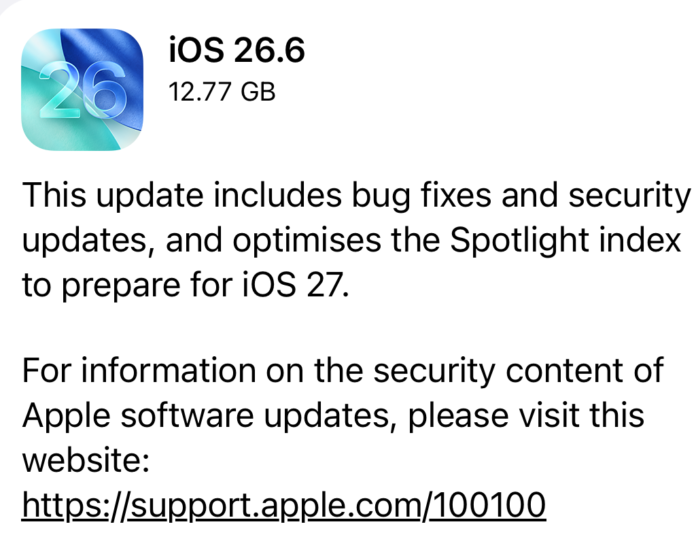
Apple has officially released iOS 26.6 to iPhone users worldwide. While late-stage point updates usually serve as quiet bug-fix releases before the next major operating system launch, iOS 26.6 plays a pivotal, strategic role in Apple’s software ecosystem.
Beyond delivering minor functional tools and resolving several persistent system bugs, this update acts as a structural bridge to iOS 27. It lays the computational groundwork for Apple Intelligence, while bundling nearly 90 high-severity security patches that fix zero-day risks across Safari, the iOS Kernel, and image-processing modules.
Whether you are looking to protect your device from emerging web exploits or want a seamless transition to Apple’s next-generation AI personal assistant, iOS 26.6 is an essential download.
Strategic Overview: Preparing iPhones for iOS 27
The defining feature of iOS 26.6 operates behind the scenes. In its official documentation, Apple highlights that this software release optimizes the Spotlight search database specifically to prepare devices for the upcoming launch of iOS 27.
                    ┌──────────────────────────────────────────────┐
                    │               iOS 26.6 UPDATE                │
                    │      Preemptive Spotlight Indexing           │
                    └──────────────────────┬───────────────────────┘
                                           │
             ┌─────────────────────────────┴─────────────────────────────┐
             ▼                                                           ▼
┌─────────────────────────┐                                 ┌─────────────────────────┐
│   A17 Pro / A18 / A19   │                                 │   Legacy iPhone Models  │
│    (8GB+ RAM Models)    │                                 │   (Pre-iPhone 15 Pro)   │
└────────────┬────────────┘                                 └────────────┬────────────┘
             │                                                           │
             ▼                                                           ▼
┌─────────────────────────┐                                 ┌─────────────────────────┐
│ Catalogues messages,    │                                 │ Faster local search,    │
│ notes, mail, & calls    │                                 │ smoother database       │
│ for contextual Siri AI  │                                 │ transition to iOS 27    │
└─────────────────────────┘                                 └─────────────────────────┘
When iOS 27 launches, Apple Intelligence will introduce a context-aware Siri AI directly integrated into the Spotlight search interface. Rather than searching solely for file names or app titles, the assistant must query your personal context—including messages, email threads, notes, call logs, and photo metadata—to answer complex queries in real time.
During public beta testing of iOS 27, developers noticed that re-indexing these massive personal databases post-installation often took days, causing battery drain, system thermal throttling, and delayed assistant responses.
By pushing the background Spotlight re-indexing into iOS 26.6, Apple eliminates these initial performance bottlenecks before iOS 27 reaches public distribution.
- Hardware Compatibility: While all iPhones receiving iOS 26.6 benefit from a cleaner database, the full capabilities of Siri AI will remain exclusive to hardware equipped with at least 8 GB of RAM and powerful Neural Engines (iPhone 15 Pro, iPhone 16 series, and newer).
- User Experience Advantage: Cataloging data weeks ahead of time ensures that when users finally toggle on iOS 27, their personal assistant can deliver immediate context-aware responses without additional indexing delays.
3 Notable New Features in iOS 26.6
While the update focuses heavily on system maintenance and underlying security, Apple included three distinct user-facing features that refine messaging security and contact management.
1. Malicious Message Detection and System-Wide Reporting
Mobile phishing, smishing, and malicious link distribution continue to grow in sophistication. iOS 26.6 introduces a proactive detection system within the Messages app that analyzes incoming texts for suspicious structures or dangerous payloads capable of compromising device privacy.
When the system flags a potentially harmful message, it alerts the user with a warning banner. Users are prompted to report and forward the malicious text directly to Apple’s threat intelligence unit. This crowdsourced telemetric data allows Apple to quickly adjust carrier-level filters and protect the broader iOS network from active scam campaigns.
2. Blocked Contacts Limit Alert and Cleanup Interface
For years, iOS maintained an unannounced cap of 20,000 blocked contacts per device. With spam calls and automated messaging bots proliferating, heavy users often reach this threshold without understanding why newly blocked numbers fail to register.
iOS 26.6 resolves this issue by introducing a clear system notification when your blocklist hits capacity. The update includes a streamlined management screen inside Settings > Phone > Blocked Contacts, allowing users to review, bulk-delete, or re-organize older entries to free up space for active spam targets.
3. HealthKit and UI Stability Adjustments
Apple resolved several long-standing software anomalies across standard apps:
- HealthKit Authorizations: Fixed an issue where third-party blood pressure monitors failed to clear privacy authorization checks.
- HDR Screenshots in Messages: Resolved a bug that caused High Dynamic Range (HDR) screen captures to look distorted or garbled when sent through iMessage.
- iCloud Sticker Syncing: Fixed corrupted custom stickers that failed to synchronize properly across multiple devices tied to the same Apple Account.
Deep-Dive: Security Analysis of the 90 Patches
While feature additions make headlines, security analysts emphasize that the vast list of nearly 90 vulnerability patches makes iOS 26.6 a critical mandatory update.
┌─────────────────────────────────────────────────────────────────────────────┐
│                       CRITICAL SECURITY AREAS PATCHED                       │
├───────────────────┬─────────────────────────────────────────────────────────┤
│ WebKit Engine     │ Prevents UI spoofing & malicious framed content risks   │
│ iOS Kernel        │ Blocks remote network filter bypasses & privilege flaws │
│ ImageIO Framework │ Patches integer overflow vulnerabilities (CVE-2026-43818)│
│ Permissions       │ Stops unauthorized apps from harvesting private data    │
└───────────────────┴─────────────────────────────────────────────────────────┘
WebKit Exploit Prevention
Multiple patches resolve weaknesses in WebKit, the rendering engine powering Safari and every third-party browser on iOS. The most notable fix, tracked as CVE-2026-64730, addresses a flaw that allowed malicious websites to perform User Interface (UI) spoofing through framed web content.
Attackers frequently leverage UI spoofing in sophisticated phishing kits to overlay authentic-looking login prompts or system dialogs over legitimate web pages, tricking users into revealing banking credentials or master passcodes.
Kernel Network Bypass Fixes
Thirteen distinct patches target the iOS Kernel—the core software layer managing hardware resources, memory, and permissions.
- CVE-2026-64735: Eliminates a severe vulnerability that permitted remote attackers to bypass active network security filters, potentially exposing local network traffic to interception.
- CVE-2026-64721: Fixes an authorization flaw where unauthorized third-party apps could read sensitive user data without requesting explicit permission prompts.
ImageIO Integer Overflows (CVE-2026-43818)
One of the most dangerous threat vectors on modern mobile platforms involves zero-click media parsing. When a messaging app receives a photo, the operating system automatically renders a preview, invoking frameworks like ImageIO.
iOS 26.6 patches an integer overflow bug in ImageIO tracked as CVE-2026-43818. Unpatched, processing a specially crafted, malicious image file could lead to arbitrary code execution on the target phone—a classic delivery mechanism for targeted spyware campaigns.
The Role of AI in Vulnerability Discovery
Notably, Apple credited security researchers who used Anthropic’s Claude AI agent to identify specific system flaws, including CVE-2026-64757. The integration of automated AI threat hunting has dramatically accelerated the rate at which vulnerabilities are found and patched, leading to shorter, more frequent patch cycles like iOS 26.5.2 and iOS 26.6.
Early Code Leak: Motion-Based Anti-Theft Lock
Code analyses of iOS 26.6 revealed underlying references to an upcoming hardware security feature expected to launch with iOS 27.
The feature utilizes internal accelerometers and gyroscopes to detect abrupt physical movements—such as a thief snatching an unlocked iPhone out of a user’s hand while they are walking. Upon detecting sudden motion paired with rapid disconnection from biological sensors, the device automatically locks the screen and mandates biometric or passcode authentication.
While the feature remains inactive in iOS 26.6, its code presence confirms that Apple is expanding physical theft protections ahead of the next major release cycle.
Cross-Platform Ecosystem Releases
Alongside the iPhone software, Apple released matching operating system updates across its product lineup:
| Platform | Version | Key Focus |
| iPadOS | 26.6 | WebKit security patches, HealthKit fixes, Spotlight indexing |
| macOS | 26.6 | Safari UI spoofing protection, Kernel memory fixes |
| watchOS | 26.6 | Sensor authorization updates, battery efficiency fixes |
| visionOS | 26.6 | Spatial media rendering stability, security patches |
| tvOS | 26.6 | Core framework bug fixes and network security updates |
How to Install iOS 26.6 Safely
Before initiating the update, ensure your device is backed up via iCloud or a computer, and confirm you have at least 3 GB of free storage to allow space for the update file to unpack and perform the Spotlight index overhaul.
- Connect your iPhone to Wi-Fi and a power charger.
- Open Settings.
- Select General, then tap Software Update.
- Tap Download and Install under the iOS 26.6 banner.
- Enter your device passcode and accept the terms to complete the process.
The installation takes approximately 10 to 15 minutes, after which your iPhone will run background Spotlight optimization in the hours following the reboot.
Frequently Asked Questions
Does iOS 26.6 slow down older iPhones due to background indexing?
No. Spotlight background indexing runs dynamically when the phone is idle, connected to power, or locked. While you may notice slight background activity during the first few hours after updating, performance normalizes quickly.
Will installing iOS 26.6 give my iPhone Apple Intelligence?
iOS 26.6 does not enable full Apple Intelligence features by itself. Instead, it prepares your phone’s database so that when iOS 27 drops later this year, Apple Intelligence features (like Siri AI) function instantly without massive indexing delays.
Why is updating to iOS 26.6 urgent even if I don’t care about new features?
The update fixes nearly 90 security flaws, including high-risk vulnerabilities in Safari (WebKit), the iOS Kernel, and image processing tools. Updating protects your device from malicious websites, phishing kits, and potential zero-click image exploits.

