The AI Agent That Works Like a 24/7 Employee (Full Breakdown & Real Use Cases)
The idea of an AI agent that actually works like a real employee has been around for a while.
But most tools fall short.
They forget context.
They need constant input.
They break when workflows get complex.
They require multiple tools stitched together.
And most importantly, they suggest what to do instead of actually doing it.
Now a new platform called Base44 is changing that narrative.
It is not just another chatbot.
It is not just another automation tool.
It is a system where:
- you describe what you want
- it connects to your tools
- it remembers context
- and it executes work continuously
Based on the full workflow demonstration you shared, Base44 is closer to:
a digital employee that runs in the cloud 24/7
The Core Idea Behind Base44
At its core, Base44 is built around a concept called a “super agent.”
Instead of:
- prompting AI repeatedly
- switching between tools
- manually triggering workflows
You create one agent that:
- understands your business
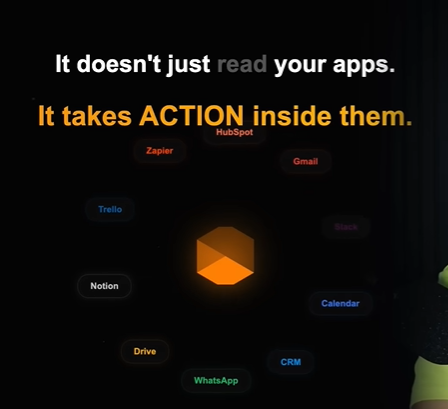
- integrates with your tools
- executes tasks autonomously
- communicates with you in real time
And most importantly:
It does not live in a dashboard.
It lives inside tools you already use.
Where Base44 Actually Lives (And Why That Matters)
One of the most important design decisions in Base44 is this:
It does not force you to learn a new interface.
From your script:
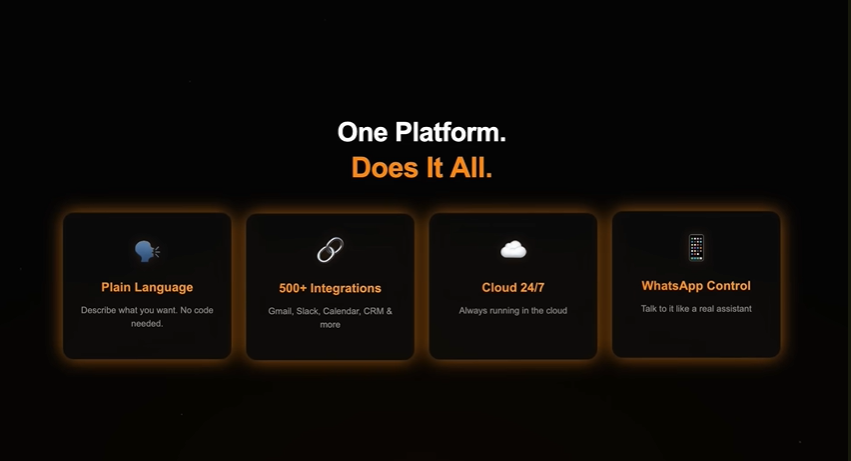
- the agent can be activated inside WhatsApp
- it can also run through Telegram
- no app download required
- no new UI to learn
That changes adoption completely.
Instead of:
- logging into dashboards
- navigating complex UIs
You simply:
- send a message
- receive updates
- approve actions
This makes Base44 feel less like software and more like:
a human assistant you text
How Base44 Actually Works (Under the Hood)
Base44 is not just responding to prompts.
It operates through a structured system that includes:
1. Knowledge
This is where you define:
- your business
- your priorities
- your rules
- your tone
- your workflows
You can upload:
- SOPs
- documents
- client data
- product information
The agent uses this to understand context.
2. Memory System
This is one of the most important differentiators.
Base44 includes three types of memory:
Short-Term Memory
- recent conversations
- active tasks
Persistent Memory (Saved Facts)
- business details
- clients
- priorities
Daily Session Memory
- summaries of all activity
- organized by date
- acts like a working journal
This means:
The agent does not forget.
It evolves.
3. File System
Each agent has its own storage layer.
It can:
- save reports
- store datasets
- reference past outputs
Think of it as:
giving your AI agent its own workspace
Why This Matters
Most AI tools fail because they lack:
- memory
- context
- persistence
Base44 solves all three.
That is why it behaves less like a chatbot and more like:
a system that accumulates intelligence over time
What Makes Base44 Different from Other AI Tools
Let’s break this down clearly.
| Feature | Typical AI Tools | Base44 |
|---|---|---|
| Memory | Limited | Persistent + evolving |
| Execution | Suggests actions | Executes tasks |
| Interface | Dashboard-based | WhatsApp / messaging |
| Integration | Manual setup | Direct integrations |
| Workflow | One-off prompts | Continuous automation |
| App Building | Separate tools | Built-in |
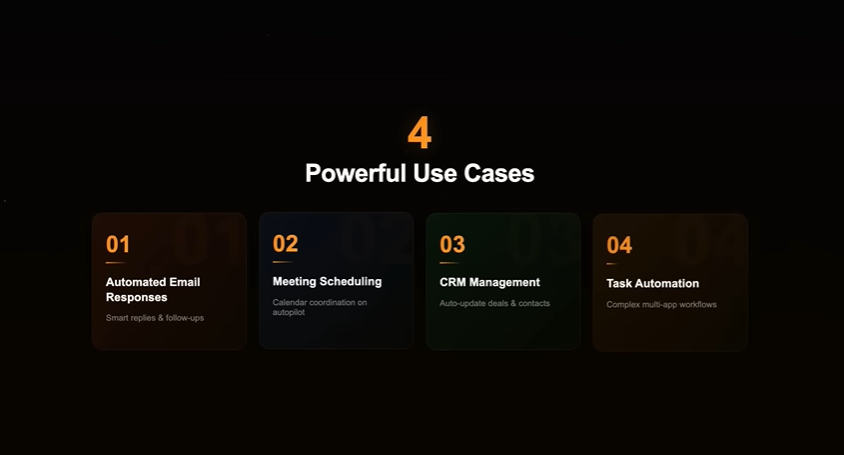
Real Use Case 1: Automated Inbox Management
This is one of the most powerful demonstrations.
You instruct the agent:
- scan inbox overnight
- identify urgent emails
- draft replies
- handle simple emails automatically
- send a summary in the morning
What happens:
- emails are processed before you wake up
- drafts are ready
- important messages are flagged
- irrelevant ones are deprioritized
This is not assistance.
This is execution.
Business Impact
- saves hours daily
- reduces cognitive load
- ensures consistency
- prioritizes automatically
Real Use Case 2: Automated Reporting
Another example:
You tell the agent:
- pull weekly sales data
- generate report
- send to Slack every Friday
It becomes:
- scheduled
- recurring
- fully automated
No dashboards. No manual exports.
Why This Matters
This replaces:
- analysts
- manual reporting
- repetitive workflows
Real Use Case 3: Real-Time Alert System
You connect Base44 to Slack.
You define:
- what counts as “critical”
- what should trigger alerts
Example:
A Slack message appears:
“Payment processing is down”
The agent:
- detects severity
- summarizes issue
- suggests actions
- sends WhatsApp alert instantly
What This Replaces
- manual monitoring
- delayed response
- missed alerts
Real Use Case 4: Calendar Optimization
This is simple but powerful.
You instruct:
- check calendar daily
- detect back-to-back meetings
- create break time
- reschedule meetings
The agent:
- moves meetings
- blocks time
- informs you
Key Insight
It does not suggest.
It acts.
The Game Changer: Base44 as an App Builder
This is where Base44 goes beyond agents.
You can:
- describe an app in plain English
- generate frontend + backend
- create database
- deploy instantly
Example:
“Build a customer feedback tracker”
Result:
- form
- database
- dashboard
- authentication
All generated in minutes.
Connecting Agents to Apps
This is the real power.
You connect your agent to the app.
Example workflow:
If rating < 3:
- alert on WhatsApp
- draft apology email
- store issue
- generate weekly summary
This creates:
closed-loop automation
What This Eliminates
Traditional stack:
- Zapier
- APIs
- webhooks
- backend logic
Base44:
- one platform
- one agent
- one workflow
Multi-Agent System (Your AI Team)
Base44 allows multiple agents:
- sales agent
- research agent
- support agent
Each has:
- its own memory
- its own knowledge
- its own integrations
Eventually:
You can consolidate into one central system.
The “AI Employee” Concept
This is where Base44 stands out.
It behaves like:
- a worker
- a coordinator
- a decision assistant
It:
- works 24/7
- does not forget
- executes tasks
- learns over time
Key Features Summary
| Feature | Description |
|---|---|
| 24/7 Cloud Execution | Runs continuously |
| Messaging Interface | WhatsApp / Telegram |
| Memory System | Persistent + evolving |
| App Builder | Full-stack generation |
| Tool Integration | Gmail, Slack, CRM, etc. |
| Automation | Fully autonomous workflows |
| Multi-Agent Support | Build agent teams |
Who Should Use Base44
Founders
- automate operations
- reduce overhead
Marketers
- manage campaigns
- monitor performance
Developers
- build apps faster
Enterprises
- automate workflows
Strengths of Base44
- No-code + powerful
- Real execution, not suggestions
- Deep memory system
- App + agent unified platform
- Works inside existing tools
Limitations (Important)
- requires setup of knowledge
- depends on integrations
- still early-stage ecosystem
The Bigger Picture
Base44 represents a shift:
From:
- tools
- prompts
- dashboards
To:
- systems
- workflows
- autonomous execution
Final Insight
This is not just another AI tool.
It is:
a new way of working
Instead of managing software:
You manage outcomes.
Simple Takeaway
If you understand Base44 in one line:
It turns instructions into execution.
Important Base44 Resources
These are the best starting resources if you want to understand Base44, try it, or go deeper into how it works.
🔗 Important Base44 Resources (Direct Links)
Below are the most useful official and supporting resources to understand, explore, and start using Base44.
1. Base44 Homepage
The main product overview for what Base44 does and how it positions itself as an AI app builder.
https://base44.com
2. Base44 Documentation
The central documentation hub with guides on getting started, integrations, billing, SEO, privacy, and app-building.
https://docs.base44.com
3. Quick Start Guide
A step-by-step official walkthrough showing how Base44 handles design, databases, authentication, and hosting from a simple prompt.
https://docs.base44.com/Getting-Started/Quick-start-guide
4. What Is Base44? (Official Blog)
A high-level explanation of the platform, including who it is for and its core capabilities.
https://base44.com/blog/what-is-base44
5. AI App Builder Page
Explains how Base44 generates full-stack apps, including templates, deployment, and built-in infrastructure.
https://base44.com/ai-app-builder
6. Use Cases Library
Explore real-world examples across operations, product, marketing, analytics, and developer workflows.
https://base44.com/use-cases
7. AI Integrations Documentation
Shows how Base44 connects with AI providers like OpenAI, Claude, Groq, and Mistral.
https://docs.base44.com/Integrations/AI-integrations
8. Integrations & Custom OpenAPI Docs
Explains how Base44 handles built-in integrations, external APIs, and secure backend proxying.
https://docs.base44.com/Integrations/Using-integrations
9. Pricing Page
Details the free plan, message credits, integration credits, and paid tiers.
https://base44.com/pricing
10. Trust Center / Security Page
Covers Base44’s security posture including SOC 2 Type II, ISO 27001, and GDPR readiness.
https://base44.com/security
11. SEO & Search Visibility Docs
Explains what Base44 handles automatically (sitemap, robots, metadata) and what you still need to optimize manually.
https://docs.base44.com/Performance-and-SEO/SEO-and-search-visibility
Base44 FAQ
1. What is Base44?
Base44 is an AI-powered app builder that turns natural-language prompts into working web apps. Its own materials describe it as suitable for turning ideas into functional apps quickly, for both beginners and more experienced builders.
2. Do I need coding experience to use Base44?
No. Base44 says you do not need coding or technical skills to start, because it handles design, databases, permissions, and hosting behind the scenes.
3. What can I build with Base44?
You can build internal tools, dashboards, workflow apps, and customer-facing products. Base44’s examples and use case library span operations, analytics, product workflows, sales, and dev productivity.
4. Is Base44 only for beginners?
No. Base44 says it supports all skill levels, and its docs include direct code access, GitHub export, custom integrations, and backend functions for more advanced users.
5. Does Base44 generate both frontend and backend?
Yes. Base44 says it generates working applications with pages, logic, and core user flows, and its quick start guide says it handles design, databases, signups, permissions, and hosting.
6. Does Base44 host the app for me?
Yes. Base44 says you can publish your app in a click, and its docs say cloud infrastructure is managed in the browser experience without local setup.
7. Can I preview the app while building?
Yes. Base44 includes a live preview so you can see how the app updates as you refine it.
8. Can I visually edit the app design?
Yes. Base44 supports Visual Edit and design tools for layout, styling, and component-level adjustments.
9. Does Base44 offer templates?
Yes. Base44 says it has a growing library of templates you can start from and customize.
10. Can I access or export the code?
Yes. Base44’s docs say you can open the code view, download the full project as a ZIP, and connect to GitHub on Builder plan or higher.
11. Does Base44 support GitHub integration?
Yes. GitHub export is supported, and Base44 notes that Builder plan or higher is required for GitHub export.
12. Can Base44 connect to external AI models?
Yes. Base44 supports AI integrations with services like OpenAI, Claude, Groq, and Mistral, plus other API-key-based AI platforms.
13. Are AI integrations available on the free plan?
Not fully. Base44’s docs say AI integrations are available on Builder tier and above, and the free tier needs an upgrade for backend functions and payment features.
14. What are connectors in Base44?
Connectors are secure OAuth-based links to tools like Google Workspace, BigQuery, Slack, Salesforce, and GitHub, so you can connect apps without manually managing API keys.
15. Can Base44 connect to custom APIs?
Yes. Base44 supports custom OpenAPI integrations at the workspace level, and calls are proxied through the Base44 backend so secrets do not reach the browser.
16. Does Base44 support backend functions?
Yes. Base44’s docs refer to backend functions, editable code files for them, and logs available in the dashboard.
17. Does Base44 support automations?
Yes. Base44 has automations, but its docs say automations require Builder plan or higher.
18. How much do automations cost inside Base44?
Base44 says each automation run uses 1 integration credit, with a maximum run time of 3 minutes and a minimum interval of 5 minutes between runs.
19. Does Base44 support AI agents inside apps?
Yes. Base44 has app-level AI agents, and its docs say you can enable them in the app dashboard. Agent chat usage consumes integration credits.
20. How do Base44 credits work?
Base44 uses two main credit types: message credits for interacting with the AI while building, and integration credits for app actions that use advanced services or external calls.
21. What do message credits cover?
Message credits are used when you ask the AI to plan, update, refine, or fix parts of your app.
22. What do integration credits cover?
Integration credits are used when the app triggers tools that send data, process content, or call external services.
23. Is there a free plan?
Yes. Base44’s pricing page says the free plan includes 5 messages per day, 25 per month total, plus 500 integration credits.
24. What are the main paid plans?
Base44 publicly describes Starter, Builder, Pro, and higher-tier options such as Elite levels, with different message and integration credit limits.
25. Can I use a custom domain with Base44?
Yes. Base44 supports custom domains on paid plans like Builder and above, and some features such as custom email sending and stronger SEO support are tied to custom domains.
26. Does Base44 help with SEO?
Yes, to a point. Base44 says it provides automatic technical SEO features like sitemap, robots handling, and social previews on custom domains, but you still need to add strong page content and trust signals yourself.
27. Does Base44 support authentication and login?
Yes. Base44 has built-in authentication with email/password and social logins, and it also supports custom identity providers through SSO.
28. Which social login providers are supported?
Base44 docs mention support for providers including Google, Microsoft, Facebook, and Apple, with SSO options for providers like Okta and GitHub depending on setup.
29. Is SSO available on all plans?
No. Base44 says SSO for apps is available on Elite plan or higher.
30. Can I accept payments in a Base44 app?
Yes. Base44 supports Stripe setup through the AI chat and also offers Base44 Payments powered by Wix.
31. Can Base44 send emails from my own domain?
Yes, but Base44 says custom-domain email sending is available on Builder plan and above, and those emails consume integration credits.
32. Is Base44 secure enough for business use?
Base44’s Trust Center says it is SOC 2 Type II and ISO 27001 certified and maintains GDPR standards. Its docs also emphasize encryption, data ownership controls, and privacy features.
33. Is Base44 GDPR-friendly?
Base44 explicitly references GDPR standards in its Trust Center and privacy/security documentation.
34. Can I build mobile apps with Base44?
Base44 is primarily a web app builder, but its docs say exported apps can be wrapped for mobile distribution using third-party tools like Capacitor or PWABuilder.
35. What are Base44’s main limitations?
The official material focuses on strengths, but practical limits still exist: some advanced capabilities require paid plans, integrations consume credits, and good outputs depend on clear prompting. That aligns with both the docs and the third-party review context you shared.

