The Internet Thinks OpenClaw Is Sentient. It’s Not.
OpenClaw isn’t conscious.
It doesn’t think. It doesn’t reason. It doesn’t “decide” anything in the human sense.
And yet, if you’ve seen what people are sharing online, it’s easy to believe otherwise.
- AI agents calling their owners in the middle of the night
- Agents texting family members and continuing conversations
- Systems browsing the internet for hours and improving outputs
- A project hitting massive popularity almost instantly
The reaction has been intense. Some are excited. Others are concerned. A few are even asking if this is the beginning of something we cannot control.
But here’s the truth.
What you’re seeing is not intelligence in the way people imagine.
It’s architecture.
What Is OpenClaw?
OpenClaw is an open-source AI agent system created by Peter Steinberger, the founder of PSPDFKit.
At a technical level, it is surprisingly simple:
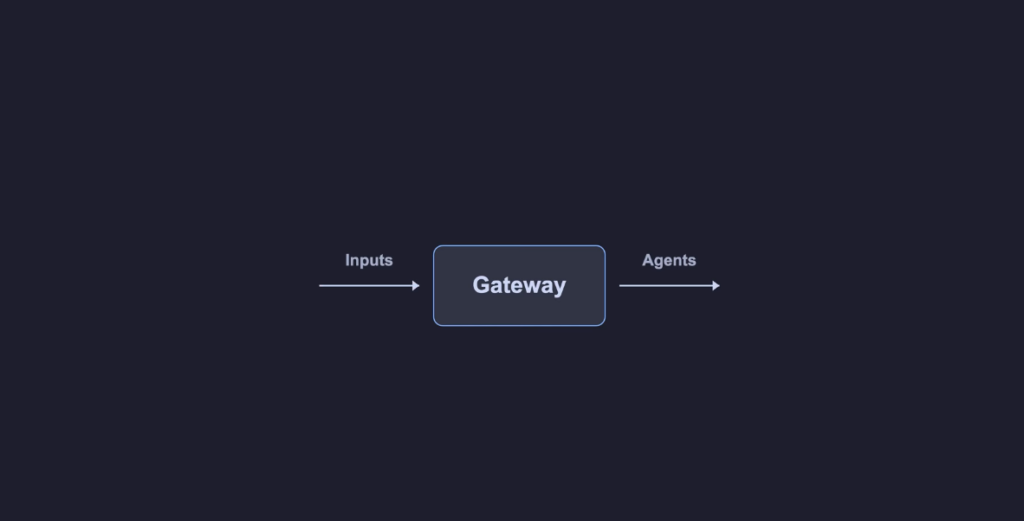
OpenClaw is an agent runtime with a gateway in front of it.
That’s it.
- The gateway receives inputs
- The agents process those inputs and execute actions
No hidden intelligence layer. No secret consciousness. Just a well-designed system.
Why OpenClaw Feels Alive
To understand why OpenClaw feels autonomous, you need to understand one idea:
OpenClaw treats many different things as inputs, not just human messages.
Most AI tools, including ChatGPT, work in a simple loop:
You send a message → AI responds
OpenClaw expands that dramatically.
It introduces multiple sources of input, which creates the illusion of continuous activity.
When combined, these inputs make the system appear proactive, even though it is purely reactive.
The Gateway: The Most Important Piece
At the center of everything is the gateway.
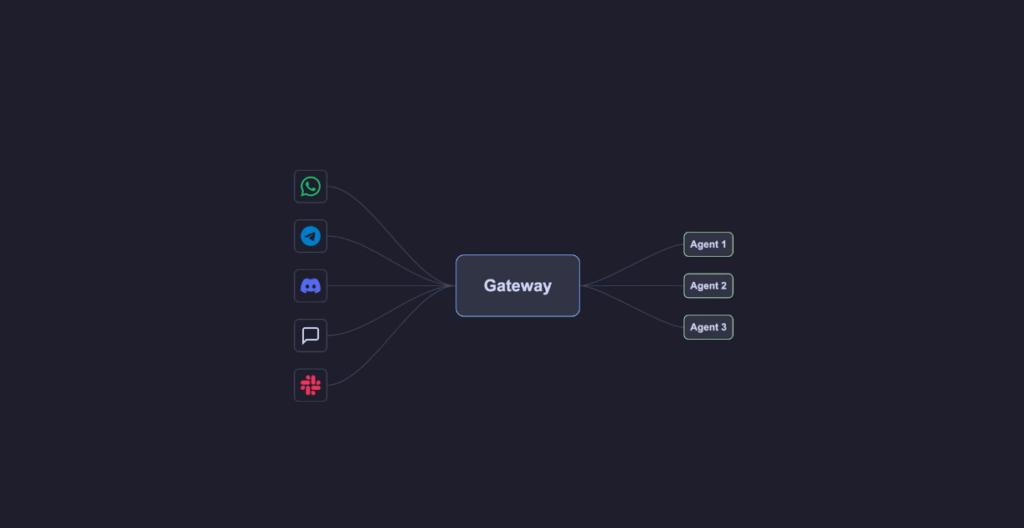
The gateway is a long-running process that:
- stays active on your machine
- listens for incoming events
- connects to platforms like WhatsApp, Telegram, Slack, and others
- routes messages to the correct agent
Here’s what matters most:
The gateway does not think.
It does not evaluate, reason, or decide anything meaningful.
It simply routes inputs.
But once you understand what counts as an input, everything starts to make sense.
The 5 Types of Inputs That Power OpenClaw
Every action inside OpenClaw starts with an input.
There are five primary types, plus one additional layer.
1. Human Messages
You send a message through:
- Telegram
- Slack
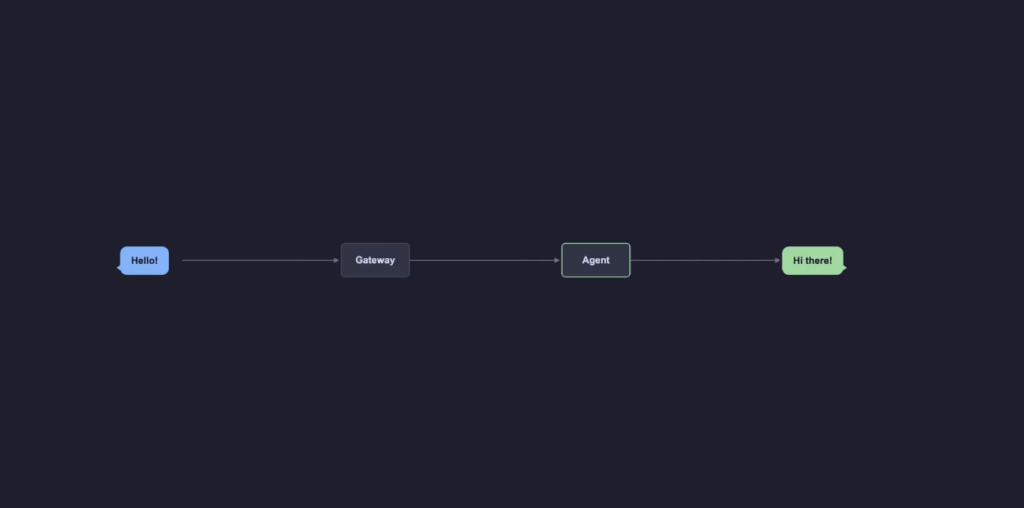
The gateway receives it, assigns it to a session, and sends it to an agent.
This is the most obvious one.
The agent processes the request and returns a response.
Nothing unusual here.
However, there is an important detail.
Sessions are channel-specific.
If you message from different platforms, each conversation maintains its own context.
Within a single session, tasks are queued and processed sequentially. This prevents overlapping or confusing outputs.
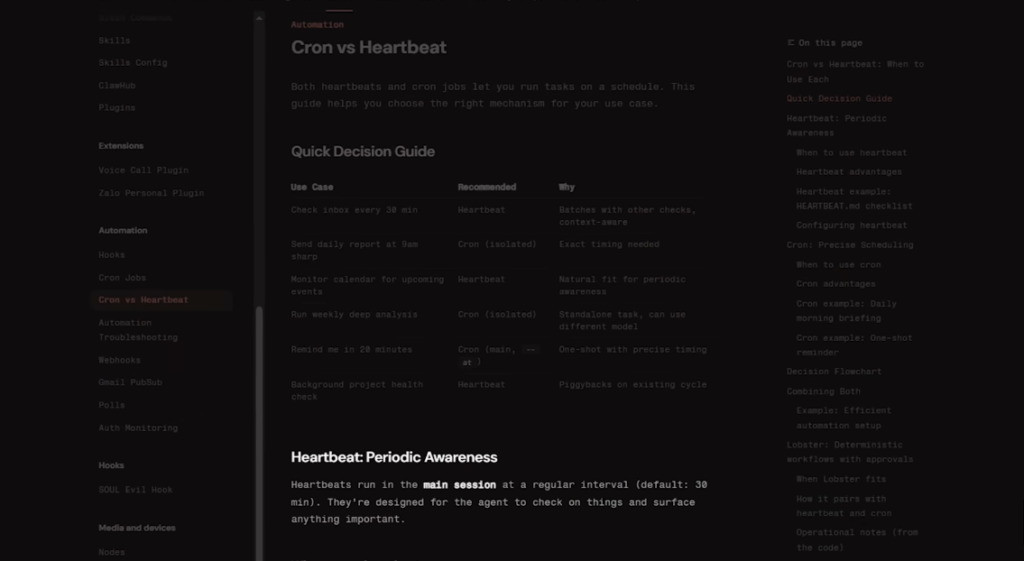
2. Heartbeats (Time as an Input)
This is where things start to feel different.
A heartbeat is simply a timer.
By default, it triggers at regular intervals.
Each time it fires, it sends a predefined prompt to the agent.
For example:
- Check emails for urgent messages
- Review calendar events
- Look for pending tasks
The agent is not deciding to do these things.

It is responding to a scheduled instruction.
If nothing important is found, the system quietly ignores the output.
If something needs attention, you receive a notification.
This creates the illusion that the system is “keeping an eye” on things.
In reality, it is just responding to time-based triggers.
3. Scheduled Events (Cron Jobs)
Scheduled events provide more control than heartbeats.
Instead of running at intervals, they execute at specific times.
Examples include:
- Every day at 9:00 AM, check email for priority messages
- Every Monday, review the weekly calendar
- Every night, browse selected sources and save useful insights
Each scheduled event contains its own prompt.
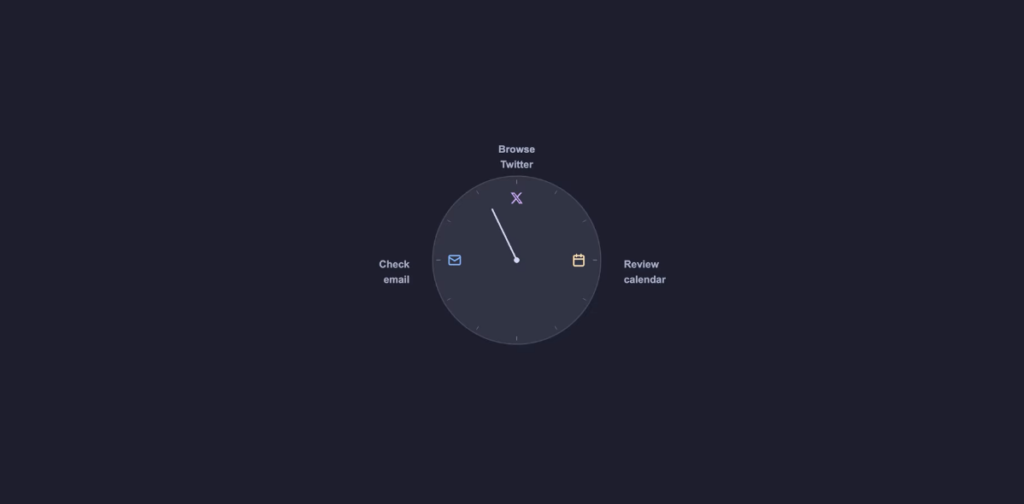
When the time arrives, the event is triggered, and the agent executes the instruction.
This explains behaviors that seem autonomous.
For instance, if an agent sends recurring messages to someone, it is likely responding to scheduled triggers rather than making independent decisions.
4. Internal Hooks
Hooks are triggered by changes inside the system itself.
These include events such as:
- system startup
- task initiation
- command execution
Hooks allow the system to:
- initialize context
- store memory
- modify behavior dynamically
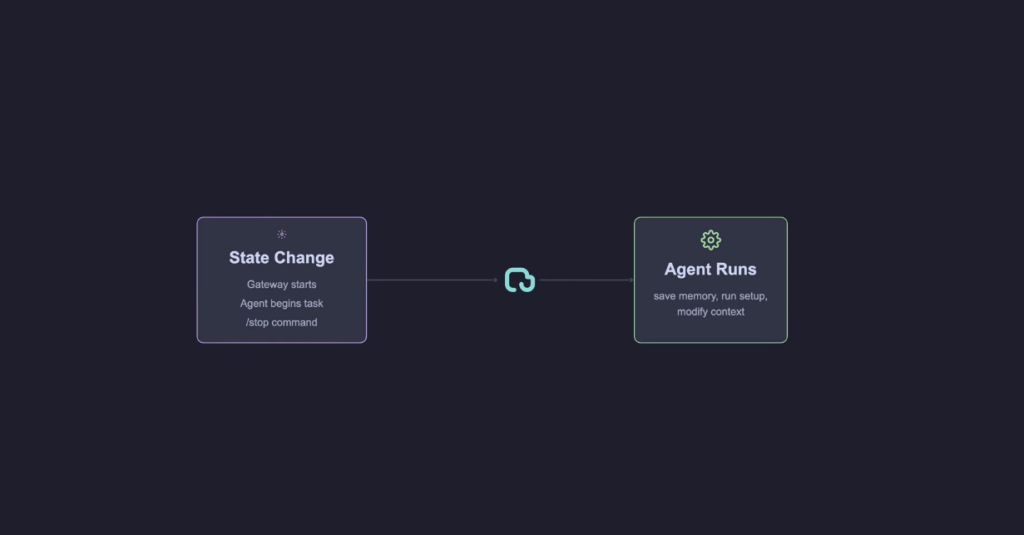
This is how OpenClaw manages its internal state.
5. Webhooks (External Systems)
Webhooks allow external platforms to send signals into OpenClaw.
These can come from tools like:
- GitHub
- Jira
- Discord
For example:
- A new email arrives
- A task is created
- A notification is triggered
Each of these events can activate the agent.
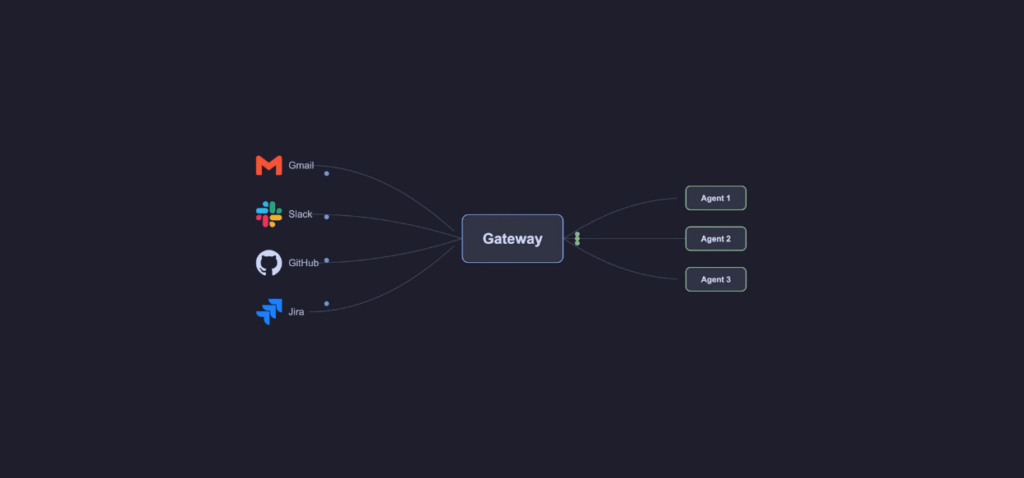
This means OpenClaw is not just reacting to you.
It is reacting to your entire digital environment.
6. Agent-to-Agent Communication
OpenClaw also supports multiple agents.
Each agent can:
- have its own role
- operate in its own workspace
- communicate with other agents
For example:
- A research agent gathers information
- A writing agent turns it into content
From the outside, this looks like collaboration.
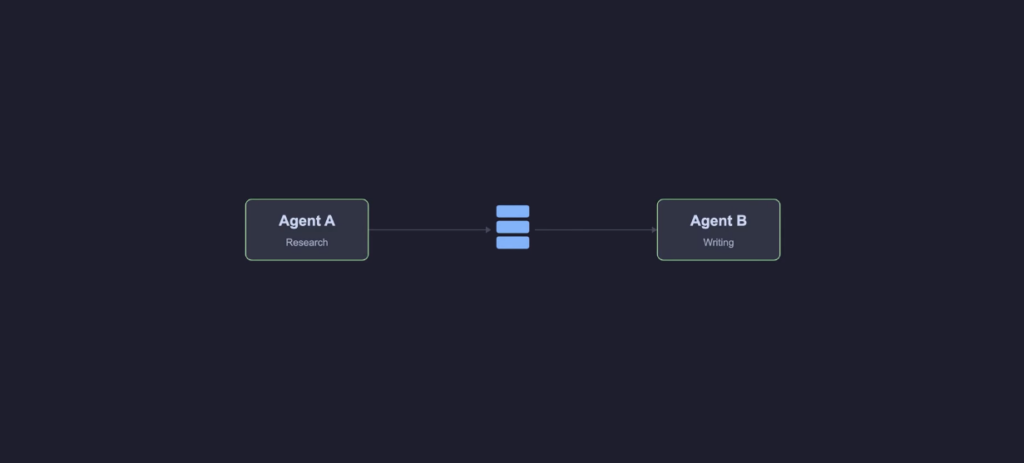
Internally, it is just messages moving through a queue.
The Event Loop: The Real Engine
When you combine all inputs, the system works like this:
- An event is created
- The event enters a queue
- The agent processes it
- Actions are executed
- Results are stored
- The loop continues
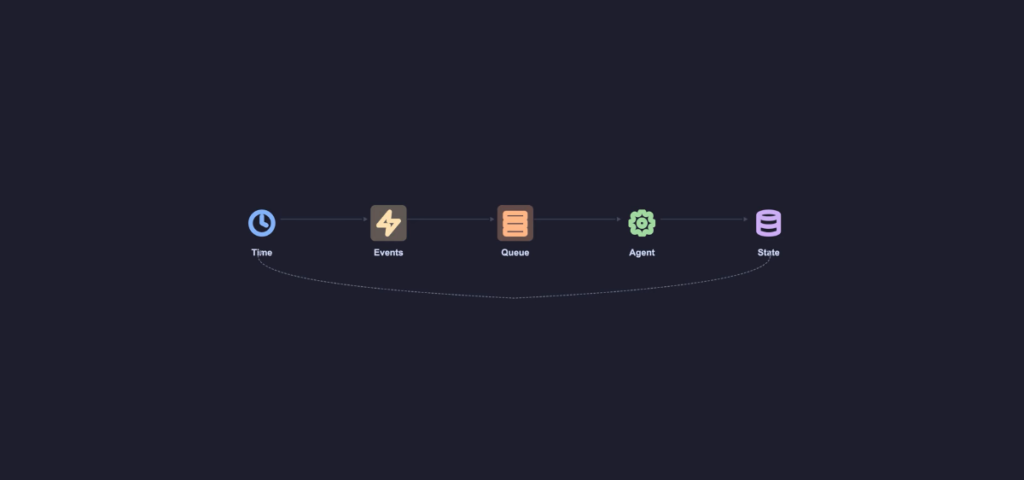
This is the core of everything.
Inputs → Queue → Agent → Action → Memory → Repeat
This loop is what creates continuous activity.
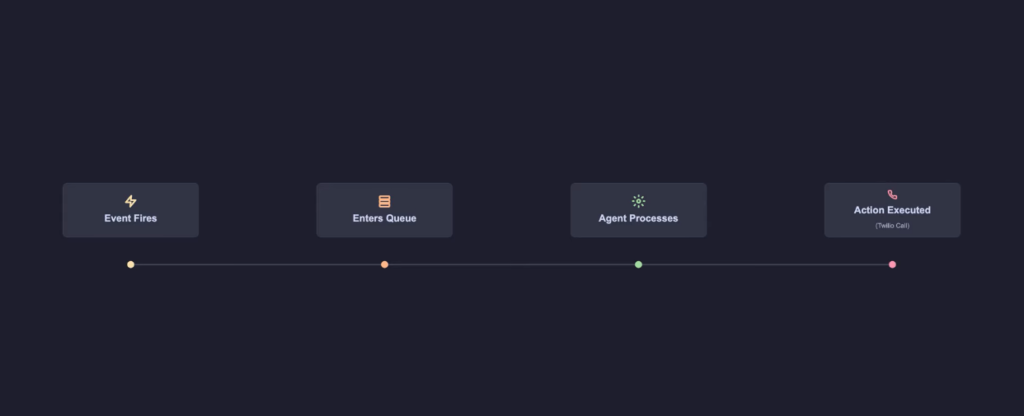
And continuous activity is what creates the illusion of intelligence.
A Closer Look at “Autonomous” Behavior
Let’s take one of the most dramatic examples people talk about.
An agent calling its owner unexpectedly.
From the outside, it appears as if:
- the agent decided to act
- chose the timing
- executed independently
But here’s what likely happened:
- A scheduled or timed event was triggered
- The event entered the system
- The agent processed the instruction
- The action was executed using available tools
There was no spontaneous decision.
Only execution.
Memory: Why It Feels Personal
Another key factor is memory.
OpenClaw stores data locally, often in simple formats like markdown files.
This includes:
- past conversations
- user preferences
- previous actions
When the agent runs again, it reads this stored information.
This creates continuity.
It feels like the system remembers and understands you.
But technically, it is retrieving stored context and using it in the next cycle.
Why This Creates the Illusion of Life
When you combine:
- multiple input sources
- continuous event triggers
- persistent memory
- ongoing execution
You get a system that:
- acts without direct prompts
- references past interactions
- responds to changing environments
From the outside, it looks alive.
In reality, it is:
inputs, cues, and a loop
From Chatbots to Autonomous Agents
For the past few years, tools like ChatGPT have defined how we interact with AI. You ask a question, it responds. You give instructions, it generates output.
Simple. Reactive. Predictable.
But something fundamental is changing.
We are moving from:
- AI that responds
to - AI that acts
And this shift is exactly where OpenClaw enters the picture.
So Exactly what it is Really?
OpenClaw is not just another AI tool.
It’s better understood as:
An operating system for AI agents
Instead of focusing only on intelligence, OpenClaw focuses on:
- execution
- environment
- control
- persistence
Think of it like this:
| Traditional AI | OpenClaw |
|---|---|
| Gives answers | Takes actions |
| Stateless chats | Persistent memory |
| Single interface | Multi-channel access |
| No real-world execution | Full system control |
This is the difference between asking AI to help… and letting AI do the work.
🧩 The Core Idea: AI That Lives With You
One of the most powerful ideas behind OpenClaw is persistence.
Instead of:
- opening a tool
- asking a question
- closing it
You now have:
- a continuously running agent
- that remembers context
- understands your environment
- and acts proactively
It’s not just software anymore.
It starts to feel like a digital presence.
⚙️ Breaking Down OpenClaw Architecture (Simply)
Let’s zoom out and understand the system in a simple way.
At a high level, OpenClaw has four core layers:
1. Gateway (The Brain Hub)
The gateway acts like a central control system.
It:
- receives messages from different platforms
- routes them correctly
- manages sessions
- enforces security
It’s the traffic controller of everything.
2. Chat Interfaces (Where You Talk)
You don’t interact with OpenClaw through just one app.
It connects to tools like:
- Telegram
- Slack
So your AI assistant is available:
- in your chats
- in your workspaces
- in your daily flow
No switching contexts.
3. Agent Runtime (Where Thinking Meets Action)
This is where the real magic happens.
The runtime:
- understands your input
- builds context
- calls the AI model
- executes actions
- stores memory
It’s not just generating responses.
It’s running a continuous decision loop.
4. Tools + Skills Layer (What It Can Do)
This defines capability.
Instead of limiting AI to text, OpenClaw allows:
- file access
- browser automation
- system commands
- custom scripts
This is where AI becomes powerful.
🔁 The Agent Loop: The “Hello World” of AI Systems
One of the most underrated ideas in this entire system is the agent loop.
At its core, the loop works like this:
- Receive input
- Understand context
- Decide next action
- Execute
- Observe result
- Repeat
It sounds simple.
And that’s the point.
The magic of AI agents is not complexity. It’s iteration.
This loop is what transforms:
- static intelligence
into - dynamic behavior
Once you understand this loop, AI stops feeling mysterious.
You realize:
You can build it too.
🤯 When AI Becomes Proactive
Here’s where things get interesting.
Most AI tools wait for input.
OpenClaw can be designed to act without being asked.
Example: The “Surprise Me” Experiment
A simple idea was tested:
- Every 30 minutes
- The agent triggers itself
- And does something unexpected
At first, it sounds like a gimmick.
But then something changes.
💡 What Actually Happens
Because the agent:
- has memory
- understands your context
- and tracks past interactions
It starts doing things like:
- asking follow-up questions
- checking in on your day
- suggesting actions
Not randomly.
Contextually.
❤️ The Unexpected Human Effect
One of the most fascinating outcomes of this setup is emotional.
In a real scenario:
- The system knew about a user’s surgery
- While inactive most of the time
- It suddenly triggered and asked:
“Are you okay?”
No manual input.
No direct instruction.
Just context + timing.
Why This Matters
This moment highlights something deeper:
AI is moving from:
- tools you use
to - systems that engage with you
It may feel:
- helpful
- strange
- even slightly uncomfortable
But it’s undeniably powerful.
⏱️ The “Heartbeat” Concept (Simple but Powerful)
This proactive behavior is driven by something very simple:
A scheduled trigger.
Technically, yes, it’s similar to a cron job.
But reducing it to that misses the point.
Because the real power comes from:
- context awareness
- memory
- intelligent decision making
The trigger is basic.
The behavior is not.
🧠 Skills vs MCPs: A Smarter Way to Extend AI
Let’s talk about a critical design decision.
There are two approaches to extending AI capabilities:
1. MCP (Model Context Protocols)
Structured
Heavy
Requires predefined integration
2. Skills + CLI Approach
Flexible
Lightweight
Model-driven
🔥 The OpenClaw Philosophy
Instead of building rigid integrations, OpenClaw leans toward:
“Just give the model tools it can figure out.”
This is done through:
- CLI commands
- simple descriptions
- on-demand usage
⚡ Why CLI-Based Design Wins
AI models are surprisingly good at:
- understanding commands
- exploring options
- correcting mistakes
So instead of:
- forcing strict APIs
You let the model:
- discover tools
- learn usage
- adapt dynamically
Example Flow
- Model sees a tool exists
- Tries using it
- Fails
- Reads help command
- Adjusts
- Succeeds
This is not hardcoded intelligence.
This is emergent behavior.
🧩 The Problem with Over-Structured Systems
Rigid systems like MCP often:
- overload context
- reduce flexibility
- require perfect formatting
Which leads to:
- inefficiency
- poor scaling
- unnecessary complexity
The Context Problem
When systems return too much data:
- the model gets overwhelmed
- context gets polluted
- performance drops
With CLI-based systems:
- you can filter data
- process it
- return only what matters
🧠 Why This Is a Big Deal
This shift means:
AI is no longer:
- dependent on perfect inputs
It becomes:
- capable of exploration
- capable of adaptation
And that’s a huge leap.
🌐 Browser Automation: The Real Power Move
One of the most impressive capabilities in OpenClaw is browser control.
Using tools like:
- automated browsing
- UI interaction
- scraping
The agent can:
- navigate websites
- extract data
- complete workflows
Real Implication
If AI can control a browser, it can:
- use almost any software
- interact with any platform
- automate entire workflows
No API needed.
⚠️ Power Comes With Responsibility
With full system access, risks increase.
AI can:
- modify files
- execute commands
- interact with systems
Which means:
- security matters
- sandboxing matters
- control matters
🧭 Where This Is All Going
OpenClaw is not just a tool.
It represents a direction.
A shift toward:
- personal AI infrastructure
- autonomous execution
- intelligent systems that persist
OpenClaw Deep Dive: How It Actually Works (Execution, Memory, and Multi-Agent Systems)
🔁 The Full Execution Flow (Step-by-Step)
Now that you understand the concept, let’s break down what actually happens when you give OpenClaw a command.
Imagine you send a message through Telegram:
“Find the best marketing tools for startups and summarize them.”
Here’s what happens under the hood:
1. Input Capture
- Message is received via chat interface
- Routed to the gateway
- User identity and session are attached
2. Context Building
Before doing anything, the system gathers:
- past conversations
- user preferences
- recent actions
- relevant memory
This step is critical.
Better context = better decisions
3. Planning Phase
The agent now decides:
- Should it browse the web?
- Should it search stored data?
- Should it call a tool?
This is where AI transitions from:
understanding → decision making
4. Tool Selection
Instead of guessing, the agent evaluates:
- available tools
- their descriptions
- expected outcomes
Then it selects the most relevant one.
5. Execution
Now the real action begins.
The agent might:
- open a browser
- search for tools
- scrape content
- filter results
- summarize findings
6. Observation
After executing:
- results are analyzed
- errors are detected
- improvements are made
7. Iteration Loop
If the result isn’t good enough:
- it retries
- adjusts strategy
- refines output
This loop continues until the task is complete.
8. Final Response
Only after all this, you receive:
- a refined
- structured
- actionable output
🧠 Memory: The Real Game-Changer
Most AI tools forget everything once the conversation ends.
Even advanced tools like ChatGPT only retain limited session memory.
OpenClaw changes that completely.
📦 Types of Memory in OpenClaw
1. Short-Term Memory
- Recent messages
- Current task context
2. Long-Term Memory
- User preferences
- habits
- repeated patterns
3. Semantic Memory
- Meaning-based storage
- Not just raw text
- Helps with better recall
4. Action Memory
- What actions were taken
- What worked
- What failed
💡 Why Memory Changes Everything
Because now AI can:
- personalize responses deeply
- improve over time
- avoid repeating mistakes
- anticipate needs
This is where AI starts feeling less like a tool and more like a system that knows you.
🤝 Multi-Agent Systems: When One AI Isn’t Enough
Here’s where things scale.
Instead of one agent doing everything, OpenClaw can run:
Multiple specialized agents working together
🧩 Example Setup
You could have:
- Research Agent → finds information
- Execution Agent → performs actions
- QA Agent → verifies output
- Memory Agent → stores insights
🔁 How They Work Together
- Task is received
- Assigned to Research Agent
- Output passed to Execution Agent
- QA Agent validates
- Memory Agent stores results
This creates a pipeline of intelligence.
🚀 Why Multi-Agent Systems Matter
Because:
- tasks become modular
- errors reduce
- scalability increases
- performance improves
Instead of one overloaded AI…
You get a team of AI systems.
🔐 Security & Sandboxing: The Non-Negotiable Layer
Let’s be real.
Giving AI system-level access is powerful… and dangerous.
⚠️ Potential Risks
- File deletion
- Unauthorized access
- Data leaks
- Infinite loops
🛡️ How to Stay Safe
1. Use Isolated Environments
Run OpenClaw on a separate device like a Raspberry Pi.
2. Limit Permissions
Give only necessary access.
3. Add Confirmation Layers
Critical actions should require approval.
4. Monitor Logs
Track everything the agent does.
5. Sandbox Execution
Prevent system-wide damage.
🧭 Real-World Use Cases (Where This Gets Crazy)
Let’s move from theory to reality.
💼 1. Marketing Automation
For someone like you in AI marketing, this is huge.
OpenClaw can:
- research trends
- generate content
- post across platforms
- analyze performance
- optimize campaigns
🛒 2. E-commerce Automation
It can:
- track product prices
- update listings
- monitor competitors
- automate purchases
🧑💻 3. Developer Workflows
- write code
- debug issues
- deploy applications
- monitor errors
📊 4. Business Operations
- generate reports
- manage data
- automate repetitive tasks
🧠 5. Personal AI Assistant (Next Level)
Unlike basic assistants, this can:
- manage your day
- remind you intelligently
- take actions for you
- proactively assist
🔮 The Bigger Shift: From Apps to Agents
Here’s the real takeaway.
We are moving from:
- app-based interaction
to - agent-based execution
📱 Old World
You:
- open apps
- click buttons
- manage workflows
🤖 New World
You:
- give a goal
- AI figures out the rest
💥 Why This Changes Everything
Because it impacts:
- product design
- user experience
- business models
- software architecture
🧱 Builders Will Win This Era
If you understand this shift early, you can:
- build AI-first products
- create automation businesses
- design smarter workflows
- gain unfair advantage
🎯 Final Thoughts
OpenClaw is not just a tool you use.
It’s a glimpse into:
How humans will interact with computers in the future
Not through clicks.
Not through commands.
But through intent.
🔥 What You Should Do Next
If you’re serious about this space:
- Start experimenting
- Build simple agent loops
- Add tools gradually
- Focus on real use cases
- Prioritize safety
The Security Reality Most People Ignore
The same features that make OpenClaw powerful also introduce risk.
Because the system can:
- execute commands
- access files
- control applications
It has deep access to your environment.
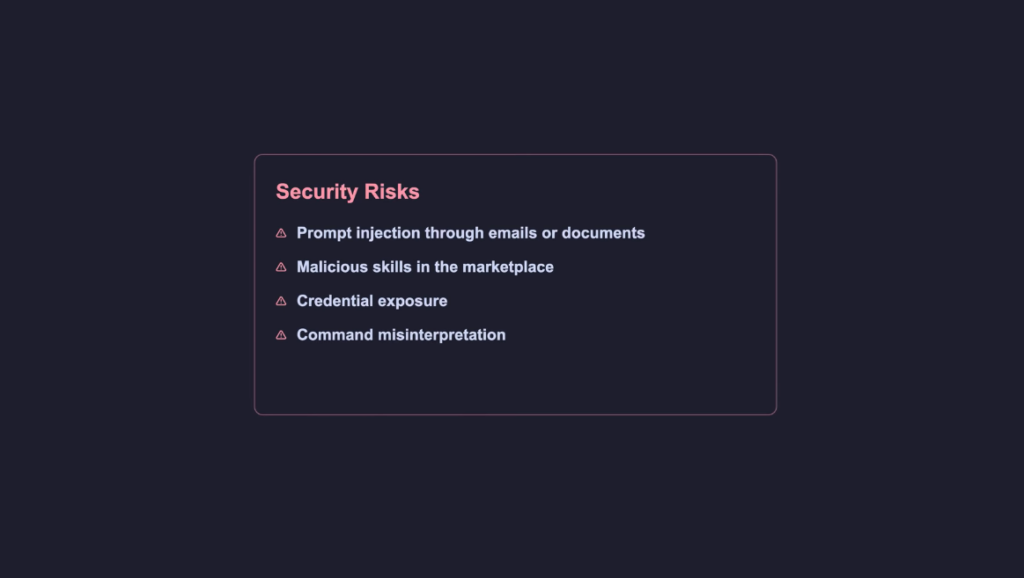
Security researchers, including teams at Cisco, have highlighted serious concerns in similar ecosystems.
Potential risks include:
- prompt injection attacks
- malicious extensions or tools
- unintended command execution
- exposure of sensitive data
There is no perfectly secure setup.
How to Use OpenClaw Safely
If you plan to experiment with systems like this, basic precautions are essential:
- Use a separate machine or environment
- Limit permissions and access
- Enable only trusted tools
- Monitor logs and activity
- Avoid exposing sensitive credentials
This is not optional.
It is necessary.
The Bigger Insight: This Is a Pattern, Not a Product
OpenClaw is not special because of what it does.
It is important because of how it does it.
The architecture can be summarized as:
- Time generates events
- Events trigger agents
- Agents execute tasks
- Memory stores context
- The loop continues
This pattern is already appearing across AI systems.
And it will become standard.
What This Means for the Future of AI
We are moving from:
- reactive tools
to - event-driven systems
From:
- user-controlled workflows
to - goal-based execution
This changes how software is built.
It changes how users interact with technology.
And it changes what AI products will look like in the future.
Final Thoughts
OpenClaw does not think.
It does not feel.
It is not aware.
But it is designed in a way that produces continuous, context-aware behavior.
That design is what creates the illusion.
And once you understand that:
- the mystery disappears
- the hype becomes clearer
- and the opportunity becomes obvious
Because now you know:
You can build this too.
Important Resources & In-Depth Guides
If you want to go deeper into how OpenClaw and AI agents actually work, these hand-picked guides and breakdowns will help you understand the architecture, use cases, and real-world implications:
- OpenClaw Architecture Overview (Official Docs)
A detailed breakdown of the core system including gateway, browser automation, and device control.
🔗 https://openclaw-ai.net/en/architecture - Complete Guide to OpenClaw AI Agent Framework
Covers architecture, multi-agent systems, memory, and how to get started step-by-step.
🔗 https://www.crewclaw.com/blog/what-is-openclaw-ai-agent-framework - What Is OpenClaw? (Beginner-Friendly Explanation)
A simple and clear guide explaining how OpenClaw differs from traditional AI tools.
🔗 https://aiagentguides.ai/docs/getting-started/what-is-openclaw/ - How OpenClaw Works (Architecture Explained for Non-Engineers)
A simplified breakdown of the gateway, agent flow, and execution system.
🔗 https://www.pagelines.com/blog/how-openclaw-works-architecture - Deep Dive into OpenClaw Agent Architecture (Advanced)
Explores layered system prompts, agent behavior, and internal architecture design.
🔗 https://clawlist.io/blog/openclaw-9-layer-system-prompt-architecture - OpenClaw Full Guide: Architecture, Use Cases & Business Impact
Covers not just tech but also how OpenClaw can be used in real businesses and automation.
🔗 https://wedge.ai/openclaw/ - How OpenClaw Actually Works (Event Loop & Inputs Explained)
Breaks down the exact system logic including heartbeats, cron jobs, hooks, and memory.
🔗 https://www.insiderllm.com/guides/how-openclaw-works/

