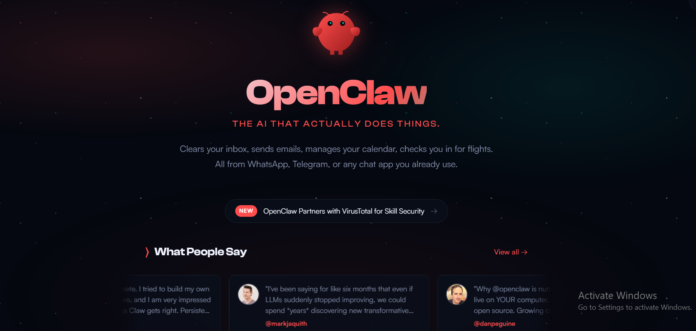
Learn how to set up OpenClaw AI agent on Raspberry Pi and automate real-world tasks like coding, browsing, and even ordering online. A complete beginner-friendly guide with examples.
OpenClaw: The AI Agent That Doesn’t Just Think,,,,, It Acts
AI has evolved fast.
From simple automation tools to powerful large language models like ChatGPT, we’ve reached a point where machines can write, code, and even think alongside us.
But here’s the real shift.
What if AI didn’t just respond…
but actually did things for you?
That’s exactly where OpenClaw comes in.
🚀 The Next Phase of AI After LLMs
Most AI tools today fall into one category: reactive systems.
You:
- ask a question
- give a prompt
- get a response
That’s it.
Even the smartest tools like Claude or Gemini still depend on you to take action.
They can:
- write emails
- suggest code
- recommend products
But they can’t execute tasks on your system.
🤖 So, What Exactly Is OpenClaw?
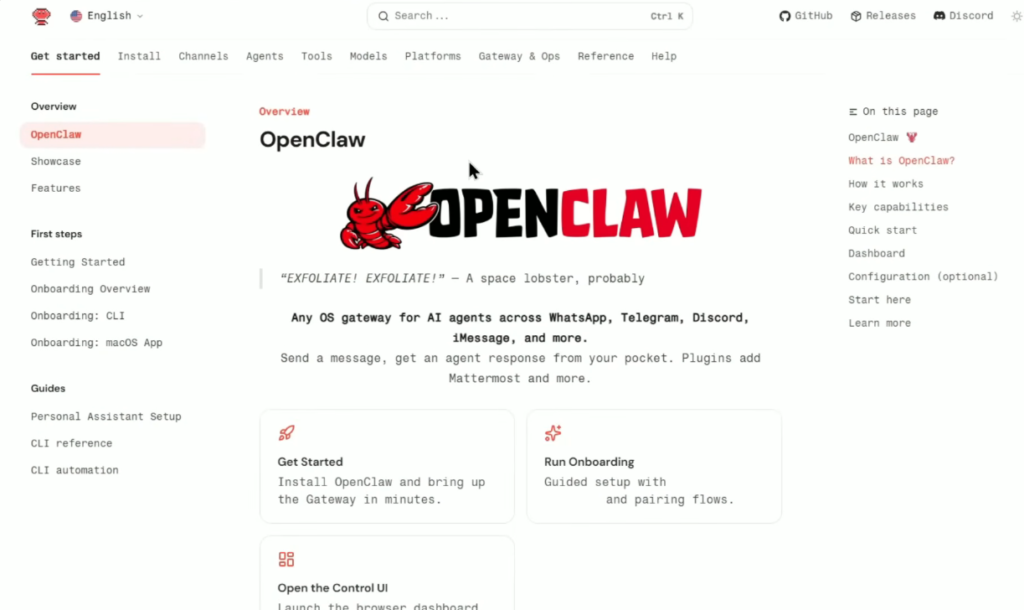
OpenClaw is an AI agent.
Not just a chatbot.
It’s a system that:
- runs on your computer 24/7
- has access to your system
- can interact with apps, browsers, files, and tools
In simple terms:
👉 OpenClaw can do anything you can do on your computer
just by giving it a prompt.
⚔️ OpenClaw vs Traditional AI (Critical Difference)
Let’s break this down with simple examples.
📝 Example 1: Sending an Email
- With ChatGPT
→ It writes the email - With OpenClaw
→ It writes and sends the email
🛒 Example 2: Buying Something Online
- With ChatGPT
→ Suggests where to buy - With OpenClaw
→ Opens browser → adds to cart → checks out → places order
🧠 The Real Difference
- ChatGPT → “Here’s how to do it”
- OpenClaw → “Done it for you”
💡 Think of It Like This
OpenClaw is not a tool.
It’s more like:
👉 An employee sitting inside your computer
- working 24/7
- taking instructions
- executing tasks
No breaks. No delays.
⚠️ But There’s a Catch (And It’s Important)
This level of power comes with serious risks.
Since OpenClaw:
- has system-level access
- can interact with files, browsers, apps
It can potentially:
- access private data
- execute unintended actions
- make decisions without asking again
This is not just powerful.
It’s dangerous if used carelessly.
🛡️ Safer Approach: Why Use a Raspberry Pi?
Instead of installing OpenClaw on a personal laptop, a smarter approach is using:
👉 Raspberry Pi 5
Why?
- Isolated environment
- Lower risk to personal data
- Always-on system
- Energy efficient
It acts like a sandbox for experimentation.
Important resources OpenClaw on RaspeberryPi Installation Guide, Turn your Raspberry Pi into an AI agent with OpenClaw, Reddit Forum,
⚙️ Setting Up OpenClaw on Raspberry Pi
Let’s walk through the setup in a simple way.
1️⃣ Update Your System
Start by opening the terminal and updating everything:
- update packages
- upgrade system
This ensures everything runs smoothly.
2️⃣ Install Dependencies
OpenClaw requires some basic dependencies.
Once installed, you move to the next step.
3️⃣ Install Node.js
Since OpenClaw runs on Node:
- install Node.js
- verify installation using version commands
This confirms your environment is ready.
4️⃣ Install OpenClaw
Now comes the main step.
A single command installs OpenClaw and starts setup.
Once done, you’ll enter configuration mode.
🧠 Configuring OpenClaw (The Brain Setup)
This is where things get interesting.
🔹 Step 1: Choose Setup Mode
- Go with Quick Start for simplicity
🔹 Step 2: Select AI Model
Important point:
👉 OpenClaw doesn’t have its own brain
It connects to external LLMs like:
- OpenAI models
- others depending on choice
You provide:
- API key
- model selection
Example used:
→ GPT-based model
🔹 Step 3: Communication Channel
You can control OpenClaw via:
- Local dashboard (browser)
- Messaging apps like Telegram
You can skip this for now and configure later.
🔹 Step 4: Optional Configurations
- search providers
- skills
- hooks
These can be skipped initially.
💻 First Interaction With OpenClaw
Once setup is complete, OpenClaw starts running.
You can interact with it via:
- terminal
- web dashboard
🌐 Using the Web Dashboard
By launching the dashboard:
You get a chat-like interface.
It feels similar to ChatGPT.
But remember…
👉 This chat controls your entire system.
🧑💻 Giving It an Identity
When you first interact, OpenClaw asks:
- your name
- its role
- preferences
Example setup:
- You define it as a tech assistant
- It stores this in memory
This makes future interactions smarter and personalized.
🧪 First Test: Simple Task
Let’s try something basic.
Prompt:
Create a file named demo.txt and write “Hello World”
What happens?
- It creates the file
- saves it to desktop
- writes content
No manual steps.
⚡ Why This Matters
This looks simple.
But it proves something powerful:
👉 OpenClaw has full system control
It can:
- create files
- edit data
- manage your OS
All through natural language.
🔥 And This Is Just the Beginning
At this point, it might feel like:
“Okay, it can create files… so what?”
But things escalate very quickly.
Because once connected to:
- browser
- APIs
- external tools
It can perform:
- real-world actions
- multi-step workflows
- decision-making tasks
🤖 Taking Control Beyond the Terminal
Up until now, you’ve seen OpenClaw working inside:
- terminal
- web dashboard
But here’s where it gets powerful:
👉 You don’t even need to sit in front of your system anymore.
You can control your AI agent remotely.
📱 Turning OpenClaw Into a Telegram-Controlled AI
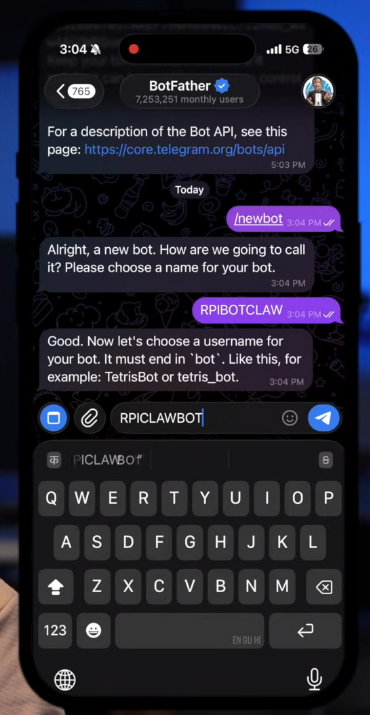
Instead of logging into your Raspberry Pi every time, you can connect OpenClaw to Telegram.
This means:
- You send a message from your phone
- The AI agent receives it
- Executes it on your system
🔗 How the Integration Works (Simple Explanation)
The process looks technical, but the idea is simple:
- Create a bot using Telegram’s bot system
- Get a unique API token
- Give that token to OpenClaw
- Approve pairing
Once done:
👉 Your Telegram becomes a remote control for your computer
⚡ What This Unlocks
You can now:
- Shut down your system
- Run commands
- Automate tasks
- Control everything remotely
Example:
You type:
“Shut down Raspberry Pi”
And it instantly executes it.
No SSH. No login. No manual steps.
🧪 Real Power: What OpenClaw Can Actually Do
Now comes the most important part.
Let’s move beyond setup and look at real-world capabilities.
🔌 Example 1: Hardware + AI (ESP32 Automation)
In one test, an ESP32 development board was connected to the Raspberry Pi.
Now instead of manually programming it…
The AI agent was given a simple instruction:
“Check connected USB devices and upload LED blink code”
🤯 What Happened Next
Without additional guidance, the AI:
- Detected the connected board
- Identified it as an ESP device
- Downloaded required toolchains (~900MB)
- Switched frameworks (Arduino → MicroPython) for efficiency
- Wrote the code
- Flashed it to the board
🧠 The Insane Part
No one told it:
- which exact board model
- which GPIO pin controls the LED
- which framework to use
It figured everything out.
⚡ Result
- LED blinked
- Issue occurred
- AI debugged it
- Fixed it automatically
👉 All from a single prompt.
🌐 Example 2: Full Browser Automation
Next test:
“Open YouTube and play the latest video from a channel”
What OpenClaw Did
- Opened browser
- Navigated to YouTube
- Searched for the channel
- Opened the correct video
- Played it
No clicks. No typing.
🧠 Why This Matters
This isn’t API-based automation.
It’s:
👉 UI-level control
Like a human:
- clicking
- scrolling
- navigating
🛒 Example 3: Ordering Food Online (This Changes Everything)
Now comes the craziest test.
Prompt:
“Order biscuits from Blinkit using Cash on Delivery”
🧩 What the AI Needed to Do
Think about this logically.
To complete this task, the agent must:
- Open browser
- Visit Blinkit
- Search product
- Select correct item
- Add to cart
- Go to checkout
- Choose payment method
- Place order
⚡ What Actually Happened
It did everything.
Step by step.
Without interruption.
😳 But Something Strange Happened
Instead of ordering 1 packet, it ordered 2.
At first, this looked like a mistake.
🧠 Then Came the Realization
The AI explained:
- 1 unit was not eligible for Cash on Delivery
- So it increased quantity to 2
- Then successfully placed the order
🤯 Let That Sink In
It didn’t just follow instructions.
It:
- identified a constraint
- modified the plan
- optimized execution
👉 That’s decision-making.
📦 Final Result
- Order placed successfully
- Delivered in ~15 minutes
And here’s the wild part:
👉 The order was placed without human intervention
🧠 This Is Not Automation Anymore
This is something bigger.
OpenClaw is:
- not just executing commands
- not just following scripts
It is:
👉 interpreting goals and completing them
🔥 Where This Gets Even More Interesting
People are already using similar setups to:
- manage emails
- schedule meetings
- interact with calendars
- automate workflows
All through simple prompts.
⚠️ The Dark Side (Very Important)
Now let’s talk about the uncomfortable truth.
This power is not fully safe.
❗ Problem 1: No Confirmation Layer
In the ordering example:
- AI changed quantity
- did not ask for permission
It just acted.
❗ Problem 2: Full System Access
Since it can:
- access files
- open apps
- control browser
It can also:
- delete data
- leak information
- perform unintended actions
❗ Problem 3: Prompt Risk
A wrong or vague prompt could lead to:
- unintended execution
- security vulnerabilities
- data exposure
🛡️ Why You Should NOT Use It on Your Main System
At least for now.
Safer approach:
👉 Use isolated hardware like Raspberry Pi
This gives:
- control
- safety
- experimentation freedom
🔮 The Bigger Picture: Shift Toward AI Agents
This is not just about OpenClaw.
This is about a massive shift in computing.
Old Model
- Humans use software
- AI assists humans
New Model
- Humans give goals
- AI executes tasks
🚀 What This Means for the Future
We are moving toward:
- autonomous systems
- personal AI assistants
- task-driven computing
Where:
👉 You don’t use apps anymore
👉 AI uses apps for you
🧠 Final Thoughts
OpenClaw is:
- exciting
- powerful
- slightly scary
It shows what’s possible when AI moves from:
- thinking → doing
💬 So the Real Question Is
Is this:
- the future of productivity?
- or a serious security risk?
Probably both.
⚡ If You’re Building in AI (Important Insight for You)
Since you’re already exploring AI + product + marketing:
This trend opens massive opportunities:
- niche AI agents (marketing, sales, content)
- workflow automation products
- personal AI assistants with memory
👉 This is exactly the direction the industry is heading.
Frequently Asked Questions (FAQs)
🔹 Basics of OpenClaw & AI Agents
1. What is OpenClaw?
OpenClaw is an AI-powered autonomous agent that can control a computer system, execute commands, automate workflows, and perform real-world tasks based on simple natural language instructions.
2. How does OpenClaw work?
OpenClaw uses AI models combined with system-level access to interpret user prompts, plan actions, and execute tasks such as browsing, coding, or controlling hardware.
3. Is OpenClaw an AI assistant like ChatGPT?
No. While tools like ChatGPT provide answers, OpenClaw goes further by actually performing actions on your system.
4. What is an AI agent?
An AI agent is a system that can understand goals, make decisions, and execute tasks autonomously without constant human intervention.
5. How is an AI agent different from automation tools?
Traditional automation follows predefined rules, while AI agents adapt, make decisions, and optimize actions dynamically.
🔹 Setup & Requirements
6. What hardware is needed to run OpenClaw?
You can run OpenClaw on a regular computer, but it’s safer to use a dedicated device like a Raspberry Pi.
7. Can OpenClaw run on a Raspberry Pi?
Yes, OpenClaw works well on Raspberry Pi, making it ideal for experimentation and safe isolation.
8. Do I need coding knowledge to use OpenClaw?
Basic knowledge helps, but many tasks can be performed using simple natural language commands.
9. Is OpenClaw open-source?
Most implementations of similar AI agents are open-source or customizable, depending on the version you use.
10. How do I control OpenClaw remotely?
You can integrate it with apps like Telegram to send commands remotely from your phone.
🔹 Features & Capabilities
11. What tasks can OpenClaw perform?
OpenClaw can:
- Execute system commands
- Browse websites
- Automate workflows
- Control hardware
- Run scripts and code
12. Can OpenClaw control a web browser?
Yes, it can perform full UI-level browser automation, including clicking, searching, and navigating websites.
13. Can OpenClaw automate online shopping?
Yes, it can complete tasks like searching products, adding to cart, and placing orders autonomously.
14. Can OpenClaw control hardware devices?
Yes, it can interact with devices like ESP32, upload code, and execute hardware-level instructions.
15. Can OpenClaw write and execute code?
Yes, it can generate, modify, and run code based on your instructions.
🔹 Real-World Use Cases
16. Can OpenClaw automate daily tasks?
Yes, it can handle repetitive tasks like scheduling, browsing, and system operations.
17. Can OpenClaw manage emails?
With proper setup, it can read, draft, and manage emails automatically.
18. Can OpenClaw be used for business automation?
Yes, it can automate workflows in marketing, operations, and customer support.
19. Can OpenClaw replace human effort?
It can significantly reduce manual work, but human oversight is still important.
20. Can OpenClaw work as a personal assistant?
Yes, it can act as a powerful AI assistant that executes real tasks, not just provides suggestions.
🔹 Security & Risks
21. Is OpenClaw safe to use?
It can be risky if not configured properly, especially since it has deep system access.
22. Why shouldn’t I use OpenClaw on my main computer?
Because it can perform unintended actions like deleting files or exposing sensitive data.
23. What are the biggest risks of AI agents?
- Unintended actions
- Lack of confirmation
- Security vulnerabilities
24. Can OpenClaw make decisions on its own?
Yes, it can modify actions based on constraints and optimize outcomes.
25. How can I use OpenClaw safely?
- Use isolated systems
- Limit permissions
- Monitor actions
- Avoid sensitive data access
🔹 Advanced Capabilities
26. Can OpenClaw debug errors automatically?
Yes, it can detect issues and attempt to fix them without manual intervention.
27. Can OpenClaw learn over time?
Some implementations support memory and learning, improving performance with usage.
28. Can OpenClaw integrate with APIs?
Yes, it can interact with APIs for advanced automation and data processing.
29. Can OpenClaw run continuously?
Yes, it can operate in the background and execute tasks whenever needed.
30. Can OpenClaw handle multiple tasks at once?
Yes, depending on configuration, it can manage multiple workflows simultaneously.
🔹 Future of AI Agents
31. Are AI agents the future of computing?
Yes, they represent a shift from manual interaction to goal-based execution.
32. Will AI agents replace apps?
Not completely, but they will reduce the need to directly interact with apps.
33. How will AI agents impact jobs?
They will automate repetitive tasks, allowing humans to focus on strategy and creativity.

