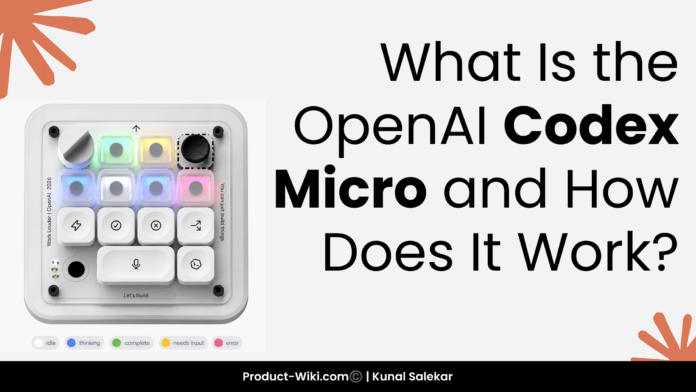
On July 15, 2026, OpenAI shipped its first ever branded hardware product. It is not a phone, not a wearable, and not the futuristic AI companion the company is building with former Apple design chief Jony Ive. It is a $230 programmable macropad called the OpenAI Codex Micro, co-built with Montreal keyboard maker Work Louder, and it is built for one specific job: making OpenAI’s Codex coding agent faster and more physical to use.
If that sounds unusual for OpenAI, it is. The company is best known for software. The fact that its first hardware play is a developer accessory, not a consumer device, tells you almost everything about who this product is for and why it exists.
This guide breaks down what Codex Micro is, the full spec sheet, how the hardware actually talks to Codex, what the headline Agent Keys feature does in practice, who the product is for, and whether it is worth $230 of your setup budget.
Quick Answer: What Is OpenAI Codex Micro?
The OpenAI Codex Micro is a compact, programmable mechanical macropad designed to control the Codex AI coding agent. It has 13 mechanical keys, a rotary encoder, a capacitive touch sensor, and a small joystick, all wired into a square aluminum and polycarbonate chassis that sits next to your main keyboard.
Six of the keys are dedicated “Agent Keys” that light up to show the live status of your running Codex threads. The other controls handle common actions: accept or reject a code change, push to talk to Codex, switch between agents, and adjust the reasoning level without opening the Codex app.
It is not a keyboard for typing code. It is a control surface for the AI that writes the code.
In one sentence: the Codex Micro is a physical command center for developers who run multiple Codex agents in parallel and want a faster, more tactile way to monitor and direct them.
Why OpenAI Made Its First Hardware Product a Macropad
For months, the rumor was that OpenAI’s first hardware launch would be a consumer device, the Jony Ive partnership, possibly a screenless AI companion meant to sit on a desk or hang around your neck. Instead, the company shipped a 13 key macropad for software developers.
The reason is strategic, not random.
Codex is one of OpenAI’s fastest growing products. According to reporting around the launch, Codex is now used by somewhere between five and nine million developers every week, and a meaningful slice of that base is already running multiple Codex agents in parallel: one fixing a bug, one refactoring a file, one writing tests, one reviewing a pull request. The friction in that workflow is not the AI. It is the interface.
Every time a developer wants to check on a running agent, accept a change, or reroute a task, they have to alt tab into the Codex desktop app, find the right thread, click the right button, and tab back. Multiply that by dozens of interruptions per day and you have a real productivity tax.
The Codex Micro exists to remove that tax. It puts the most common Codex actions on a physical surface that lives next to your main keyboard. The result is fewer context switches, faster approvals, and a workflow that feels more like supervising a team of engineers than babysitting a chat window.
In OpenAI’s own framing, the device is meant to “supercharge people’s Codex usage.” That is the entire pitch. It is a faster on ramp into the part of the product that already works.
The Story Behind Codex Micro
Codex Micro was first teased on June 30, 2026, when OpenAI’s developer focused X account posted a short video captioned “Your favorite Codex shortcuts are getting an upgrade.” The silhouette in the teaser immediately looked like a Work Louder Creator Micro 2, a popular macropad already used by creators, designers, and developers.
That hunch turned out to be correct. OpenAI confirmed the partnership: Codex Micro is built on Work Louder’s Creator Micro 2 chassis, the same platform Work Louder previously reskinned for Figma in 2023. Work Louder cofounder Mike Di Genova walked through the device in a launch video, and OpenAI spokesperson Dominik Kundel described it as a keyboard designed to “supercharge people’s Codex usage.”
Two important context points worth knowing:
It is not the Jony Ive device. That product is still in development, expected around 2027, and aimed at consumers. Codex Micro is a developer tool. If you have seen press about a futuristic screenless OpenAI gadget, that is a different product on a different timeline.
It is a limited run. Both OpenAI and Work Louder have described the launch as a limited collaboration. The product is being sold through OpenAI’s Supply Co. storefront and Work Louder’s own store while supplies last. There is no public commitment to ongoing production, which makes this feel more like a curated drop than a permanent catalog item.
Codex Micro Specs and Hardware
Here is the full spec sheet, based on the official product listing, the launch video, and verified press coverage from launch day.
| Spec | Detail |
|---|---|
| Price | $230 USD |
| Chassis | Work Louder Creator Micro 2 (reskinned) |
| Connection | USB-C wired, Bluetooth wireless |
| Compatibility | macOS, Windows |
| Mechanical switches | 13 low profile POM or POK, clicky or silent, 40 plus or minus 10gf actuation, 2.8mm travel, 50 million keystroke rating |
| Rotary encoder | 1, clickable |
| Touch sensor | 1, capacitive, cycles through 6 programmable layers |
| Joystick | 1, planar (2D analog) |
| Lighting | Per key RGB, plus LED lit acrylic edge |
| Keycaps included | 32 custom Codex icon caps, 11 solid color caps |
| Software | ChatGPT Codex desktop app, Work Louder Input app |
| Build | CNC machined polycarbonate and aluminum, sandblasted anodized bottom |
| Switch options | Clicky or silent linear |
| Layers | 6, switchable via the touch sensor |
| Colorway | Limited edition Codex branding |
Two specs are worth lingering on.
The 13 mechanical switches are individually programmable. Each one can be remapped to any Codex action or to a custom shortcut through the Work Louder Input app. Six of those keys, on the top row, are the headline Agent Keys, which we cover in detail in the next section.
The chassis is a reskinned Work Louder Creator Micro 2, which is a known quantity in the keyboard community. It is a compact square device roughly the size of a small mousepad, designed to live next to your main keyboard without taking over your desk. Work Louder’s standard Creator Micro 2 retails at $144 wired or $174 with Bluetooth. The OpenAI co branded version is $230, a premium of roughly $55 to $85 over the base hardware.
That premium buys you the Codex integration, the Agent Key firmware, the custom icon keycap set, and the limited edition status. You are not paying for different switches or a different chassis. You are paying for OpenAI branding and a Codex specific feature set that does not exist on the base Creator Micro 2.
The Software Side: How Codex Micro Talks to Codex
The hardware is only half the story. What makes Codex Micro more than a fancy macropad is its tight integration with the ChatGPT Codex desktop app.
When the device is plugged in or paired over Bluetooth, it shows up inside Codex as a recognized controller. From there, every key, the dial, the joystick, and the touch sensor can be assigned to a Codex specific action:
- Accept or reject a code change proposed by an agent
- Push to talk to Codex using your voice
- Start a new chat or thread
- Switch between active agents
- Adjust the reasoning level (low, medium, high) on the fly
- Open the composer bar in the Codex app
- Pull a specific agent’s window to the foreground
- Trigger a pull request review or a refactor workflow
Two configuration tools are available. Work Louder’s proprietary Input app is the default: it lets you create custom actions, multi step macros, and application linked layer switching, which means the device can automatically switch its active layer when a specific app comes into focus. For power users, the open source VIA configurator (built on QMK firmware) is also supported, so you can remap keys in real time without reflashing the device.
In practice, this means Codex Micro behaves less like a generic macro pad and more like a Codex specific controller. The button labeled “accept” does not send a generic keystroke. It accepts a code change in your active Codex thread. The dial does not scroll a window. It changes the reasoning level for the next prompt you send.
That level of integration is the entire reason the product exists.
Agent Keys: The Headline Feature Explained
If you only learn one thing about Codex Micro, learn about the Agent Keys.
The top row of the device contains six dedicated keys, called Agent Keys, with frosted shine through keycaps. Each one is tied to a Codex agent. By default, the six agents are whichever Codex threads you have pinned, used most recently, or flagged as priority. You can reassign them through the Input app.
What makes the Agent Keys special is the lighting. Each key glows in a different color depending on the live state of its assigned agent:
- White: the agent is idle
- Blue: the agent is thinking or actively working
- Green: the agent has completed its task
- Amber: the agent is waiting on you for input
- Red: the agent has hit an error
That means you can glance at the device and know, without opening a single window, what every agent you are running is doing. If all six keys are blue, your agents are busy. If one turns green, that one is done. If one turns red, that one needs your attention.
The interaction is just as simple. A single press on an Agent Key switches your Codex view to that agent’s thread. A double press pulls the agent to the foreground. If you prefer, you can also use the Agent Keys as launcher buttons: press a key to fire a specific prompt or to trigger a predefined workflow tied to that agent.
For developers running multiple agents in parallel, this is the actual unlock. The Codex Micro turns “check on agent” from a four step keyboard and mouse routine into a one button glance.
Command Keys, Dial, and Joystick
Below the Agent Key row sit six more programmable keys, which by default handle the most common Codex actions:
- Accept a code change
- Reject a code change
- Branch the current thread
- Start a new chat
- Push to talk (voice input to Codex)
- A larger key for push to talk so it is easy to find by feel
A larger key at the bottom activates push to talk, and a thin LED lit acrylic edge along the device glows whenever Codex is listening through the microphone. That is a small detail, but it is the kind of visual feedback that prevents the awkward “is it hearing me” moment in a shared office.
Navigation is handled by two analog controls. The joystick controls the Codex composer bar out of the box, and the rotary dial handles selections. Both can be remapped. In the launch demo, the dial is also used to adjust the reasoning level (low, medium, high) for the next prompt, which is one of the most useful shortcuts in Codex and a great use of an analog control.
All 13 keys, the dial, the joystick, and the touch sensor are fully programmable. The default layout is a sensible starting point, but power users will almost certainly remap most of the keys within the first week.
How Codex Micro Actually Works in a Coding Workflow
A typical day with Codex Micro looks something like this.
You start a Codex session and fire off three background tasks: one to write tests for a refactor, one to fix a known bug, and one to draft a pull request description. Each of those tasks gets assigned to one of the six Agent Keys. The keys turn blue, indicating all three agents are working.
You keep coding on your main task. Every few minutes, you glance at the macropad. Two of the keys are still blue. One has turned green, which means your tests are done. You single press the green Agent Key, review the diff in Codex, and double press the key labeled “accept” to merge the change. You keep going.
Twenty minutes later, a key turns amber, meaning an agent is waiting for you. You press it, see that the bug fix agent needs clarification on edge cases, type a quick reply, and send it. The key turns blue again.
An hour later, one of the keys turns red. An agent hit an error. You press the key, read the failure log, decide the prompt was wrong, and use the command key to start a new chat with a refined prompt. The new agent takes over the same Agent Key slot.
Throughout the day, you use the dial to bump the reasoning level up for the harder tasks and back down for the trivial ones, without ever opening the Codex settings panel. You use the push to talk key a few times when you would rather dictate a prompt than type it.
By the end of the day, the macropad has saved you dozens of small interruptions. Nothing about the AI changed. The hardware just made the interface faster.
Who Codex Micro Is For (and Who Should Skip It)
Codex Micro is not for everyone. Here is the honest breakdown.
It is a strong fit if you:
- Use Codex daily, especially for multi step coding work
- Regularly run more than one Codex agent in parallel
- Spend a meaningful chunk of your day accepting, rejecting, or steering agent output
- Care about tactile controls and dislike alt tabbing into a chat app
- Already own premium keyboard gear and enjoy customizing your setup
- Are an early adopter who wants to be on the leading edge of dev tools
It is probably not worth it if you:
- Use Codex occasionally, or only for short one shot prompts
- Mostly work in a single Codex thread at a time
- Prefer to keep your desk minimal
- Are on a tight budget and $230 would meaningfully hurt
- Use Linux as your primary dev OS (Codex Micro officially supports Mac and Windows only, with Linux support unconfirmed at launch)
- Do not already use Codex enough to feel the friction the device solves
The product is built for the heavy Codex user, the kind of developer who already feels the pain of context switching between agent threads. For that audience, the $230 will pay for itself quickly in reclaimed focus time. For everyone else, it is an expensive curiosity.
Codex Micro vs. a Regular Macropad
A reasonable question: why not just buy a $30 Stream Deck or a $150 Creator Micro 2 and configure it yourself?
Three things make Codex Micro different from a generic macropad:
1. The Codex integration is firmware level. A regular Stream Deck can trigger hotkeys and shortcuts, but it does not know the live state of a Codex agent. Codex Micro does, because the firmware is built specifically to read Codex thread status and reflect it through the Agent Key lighting. That is the headline feature, and you cannot replicate it with a generic pad.
2. The default mappings are Codex specific. Every default button on Codex Micro is mapped to a real Codex action, not a generic shortcut. Out of the box, you can accept, reject, push to talk, and switch agents without any configuration. A generic macropad would need significant custom setup to match that.
3. The icon keycap set reinforces the workflow. The 32 included Codex icon caps are designed for the actions the device performs. They make the default layout self documenting, which lowers the learning curve. You can put any keycap on a generic pad, but you would have to source and design your own icon set.
For developers who do not use Codex, a Creator Micro 2 at $144 or $174 is the better deal. For developers who live in Codex all day, the Codex Micro premium is justified by the integration alone.
Price, Availability, and How to Buy
The OpenAI Codex Micro is priced at $230 USD. It is available now through two channels:
- OpenAI Supply Co. storefront (the limited collaboration page)
- Work Louder’s own online store
Both companies have described the launch as a limited run. There is no public roadmap for restocks, and no commitment to ongoing production. If you want one, the practical advice is to order sooner rather than later, because the supply is finite and demand from curious developers is high.
Shipping is open to multiple regions. The official spec sheet confirms Mac and Windows compatibility. Linux is not officially listed as a supported platform, although the underlying VIA configurator works on Linux, so power users may be able to make it function. iOS and Android support, which the base Creator Micro 2 chassis supports, is not part of the official Codex Micro spec sheet.
Buyers can choose between two switch types: a clicky option with audible feedback, or a silent linear option for quieter offices. Both use the same POM or POK low profile mechanical switch platform.
The package includes the Codex Micro unit, a USB-C to USB-C cable, and the Codex icon keyset (32 custom caps plus 11 solid color caps).
OpenAI Codex Micro Keyboard Price in India
The OpenAI Codex Micro is a compact programmable mechanical keyboard created through a collaboration between OpenAI and hardware manufacturer Work Louder. Instead of functioning as a traditional keyboard, it is designed as a productivity controller for developers who regularly work with Codex, AI coding assistants, and multiple software development workflows.
The device combines programmable mechanical keys, a rotary encoder, and additional control inputs that allow developers to execute custom shortcuts, monitor AI coding tasks, switch between different coding agents, and streamline repetitive development actions. Because it is released as a limited edition device, the Codex Micro is aimed primarily at software engineers, AI developers, and technology enthusiasts looking for a more efficient coding experience.
OpenAI Codex Micro Keyboard Price in India
| Model | Global Price | Estimated Price in India |
|---|---|---|
| OpenAI Codex Micro Keyboard | USD 230 | Approximately ₹20,000 to ₹22,000 |
Note: The final retail price in India may vary depending on currency exchange rates, import duties, taxes, shipping costs, and seller pricing.
OpenAI Codex Micro Keyboard Specifications
| Feature | Details |
|---|---|
| Product Name | OpenAI Codex Micro |
| Type | Programmable Mechanical Keyboard Controller |
| Official Price | USD 230 |
| Estimated India Price | ₹20,000 to ₹22,000 |
| Collaboration | OpenAI and Work Louder |
| Connectivity | USB Type C and Bluetooth |
| Supported Platforms | Windows and macOS |
| Target Users | AI Engineers, Software Developers, Coders and Tech Enthusiasts |
Is the OpenAI Codex Micro Worth Buying in India?
The Codex Micro is not intended to replace your everyday keyboard. Instead, it serves as a dedicated control pad that enhances AI assisted development by giving developers quick access to programmable shortcuts and workflow automation. Users who spend significant time working with OpenAI Codex or AI powered coding tools can benefit from faster task switching and improved productivity.
For Indian buyers, the expected price of around ₹20,000 to ₹22,000 places it in the premium accessory category. While casual programmers may find it difficult to justify the cost, professional developers, AI engineers, and power users who rely heavily on AI coding workflows may consider it a worthwhile investment for improving efficiency and creating a smoother development experience.
Limitations, Unknowns, and What to Watch
Even with the launch complete, there are a few open questions worth flagging.
Linux support. The official spec sheet says Mac and Windows. The base Creator Micro 2 chassis works on Linux, and the VIA configurator is Linux native, so technically the hardware should work. Whether OpenAI’s Codex integration works on Linux has not been confirmed.
Long term support. This is a limited run collaboration. There is no public commitment to a v2, ongoing firmware updates, or a wider retail launch. Buying in means accepting that this is a collector piece as much as a tool.
Software lock in. Codex Micro is designed to control the Codex desktop app specifically. If you switch to a different AI coding tool, the device becomes a very expensive generic macropad. That is fine if you are committed to Codex. It is a risk if you are not.
Resale value. Limited run co branded hardware tends to hold value well, especially in the keyboard enthusiast community. The flip side is that a small market also means liquidity if you change your mind.
For most buyers, none of these are dealbreakers. They are just things to know before spending $230.
Final Verdict
The OpenAI Codex Micro is exactly what it claims to be: a fast, well built, Codex specific control surface for developers who want their AI coding workflow to feel more physical and less chat driven. It does not replace your keyboard. It does not replace Codex. It just makes the parts of Codex that you touch most often a button press away.
For the developers who run multiple Codex agents every day, the value is real. The Agent Key lighting alone is worth the price of admission, because it eliminates a category of small but constant interruptions. The dial, the joystick, and the push to talk key are well chosen defaults, and the icon keycap set makes the device feel like a real product instead of a hack.
For everyone else, it is an interesting first move into hardware from OpenAI, but not a must buy. Wait for a v2, wait for Linux support, or wait until the limited run returns.
Either way, Codex Micro is a signal. OpenAI is taking Codex seriously enough to build hardware around it. The next version will be even better.
Frequently Asked Questions
What is the OpenAI Codex Micro? The OpenAI Codex Micro is a $230 programmable macropad built in partnership with keyboard maker Work Louder, designed to control OpenAI’s Codex AI coding agent. It features 13 mechanical keys (including six dedicated Agent Keys with live RGB status lighting), a rotary encoder, a capacitive touch sensor, a joystick, and tight integration with the ChatGPT Codex desktop app.
How much does the Codex Micro cost? The Codex Micro is priced at $230 USD. It is sold through OpenAI’s Supply Co. storefront and Work Louder’s online store as a limited run collaboration while supplies last.
When was the Codex Micro released? The Codex Micro launched on July 15, 2026, alongside a Codex shortcuts upgrade. OpenAI first teased the device on June 30, 2026.
What are Agent Keys on the Codex Micro? Agent Keys are six dedicated keys on the top row of the Codex Micro. Each one is bound to a Codex agent, and its RGB color reflects the live state of that agent: white for idle, blue for thinking, green for complete, amber when input is needed, and red for errors. Pressing an Agent Key switches to that agent’s thread, and double pressing brings it to the foreground.
Does the Codex Micro work on Linux? Officially, Codex Micro supports macOS and Windows. The underlying Work Louder Creator Micro 2 chassis works on Linux, and the open source VIA configurator is Linux native, so basic hardware functionality is likely. However, OpenAI has not confirmed full Codex integration on Linux at launch.
Is the Codex Micro a keyboard? Not in the traditional sense. The Codex Micro is a macropad, a small input device with programmable keys, a dial, and a joystick. It is designed to sit next to a normal keyboard and control the Codex app, not to type code.
Can I use the Codex Micro without Codex? The hardware can be remapped to general purpose macros using the Work Louder Input app or the VIA configurator, so technically yes. But the Codex specific features, including Agent Key status lighting and the default command key mappings, only work with the Codex desktop app. Without Codex, it functions as a fairly expensive generic macropad.
Is the Codex Micro the Jony Ive device? No. The Jony Ive consumer device is a separate, unreleased product expected around 2027. The Codex Micro is a developer accessory built with Work Louder and is unrelated to the Ive partnership.
Will there be a Codex Micro v2? OpenAI has not announced a successor. Given that the launch is positioned as a limited run, a v2 is not guaranteed, although the strong early response makes a follow up likely.
Where can I buy the Codex Micro? The Codex Micro is available through OpenAI Supply Co. and Work Louder’s online store. Supply is limited, and there is no public restock schedule.

