What is Claude Design and Why Everyone is Talking About It
Artificial intelligence has already transformed how we write, code, and analyze data. But now, it’s entering a space that was traditionally considered deeply human: design.
Claude Design, introduced by Anthropic, is one of the most significant steps in this direction. It allows users to generate presentations, mobile UI designs, landing pages, animations, and even full design systems using just natural language prompts.
In simple terms, instead of opening tools like Figma, Canva, or Adobe and manually creating designs layer by layer, you can now describe what you want—and AI builds it for you.
This isn’t just another AI feature. It represents a shift:
- From manual design → to prompt-driven creation
- From tools → to intelligent collaborators
- From execution → to direction and iteration
What makes Claude Design particularly interesting is that it doesn’t just generate static outputs. It:
- Understands layout and visual hierarchy
- Applies typography and color logic
- Builds interactive prototypes
- Allows real-time edits and iterations
- Connects design to code (exportable outputs)
This means design is no longer limited to designers. Founders, marketers, product managers, and even students can now create high-quality visuals without deep technical or design expertise.
But the real question is:
Where does this actually matter in the real world?
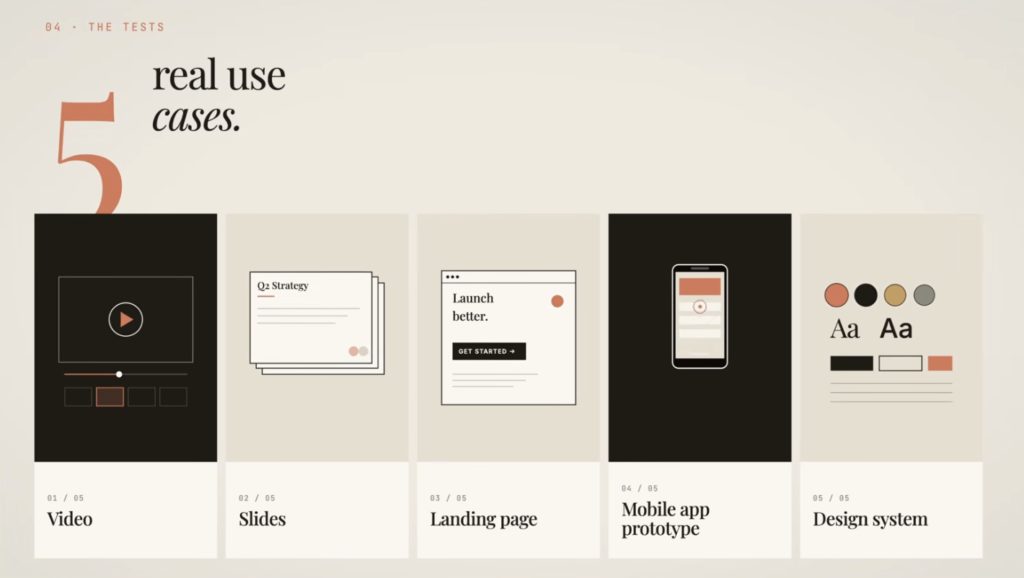
Let’s break down the top 5 real use cases of Claude Design, along with practical examples, workflows, and insights.
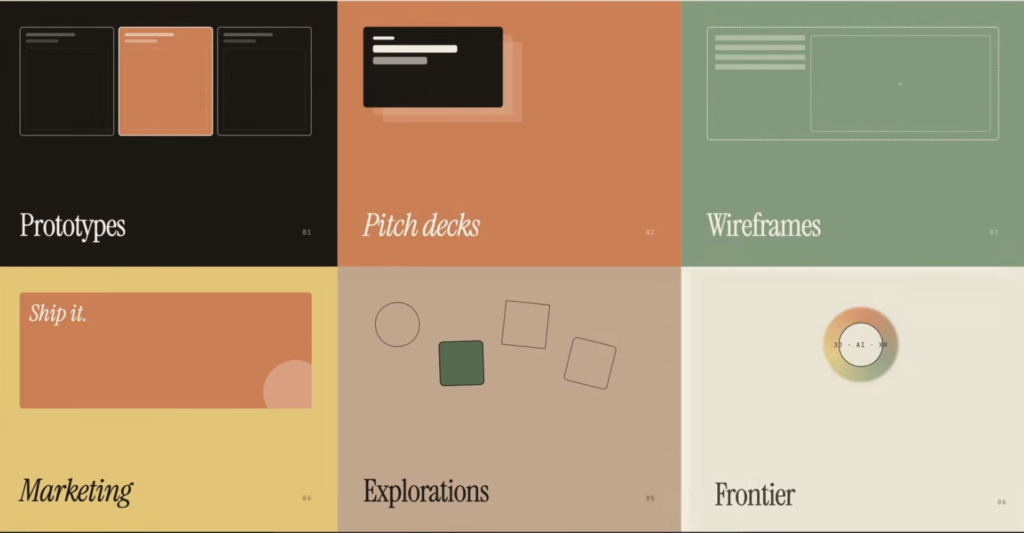
Use Case 1: Creating Pitch Decks and Presentations in Minutes
Why This Matters
Creating a professional pitch deck traditionally requires:
- Writing content
- Structuring slides
- Designing layouts
- Maintaining visual consistency
This process can take hours or even days.
Claude Design compresses this entire workflow into a single prompt + iteration loop.
Example
Prompt:
“Create a 6-slide pitch deck for an AI content agency targeting Indian D2C brands. Include problem, solution, market size, business model, and competitive advantage.”
Within seconds, Claude Design generates:
- Structured slides
- Headlines and subtext
- Consistent typography
- Clean layouts
- Logical storytelling flow
What Makes This Powerful
- Auto-structured storytelling
- It doesn’t just design slides—it organizes ideas logically.
- Design consistency
- Fonts, spacing, colors remain aligned across slides.
- Editable output
- You can tweak individual elements without starting over.
- Speed
- What used to take 3–4 hours now takes minutes.
Workflow (Practical)
- Start with a rough idea
- Prompt Claude Design
- Review generated slides
- Use “tweaks” to refine:
- Change tone (formal, bold, minimal)
- Adjust colors or layout
- Export as PDF or PPT
Where This Is Used
- Startup founders pitching to investors
- Product managers presenting features
- Students creating academic presentations
- Marketers building campaign decks
Limitation
- First output = 80–90% accuracy
- Final 10–20% still requires human judgment
Use Case 2: Designing Mobile App Interfaces Without Coding
Why This Matters
Building UI/UX typically requires:
- Design skills (Figma, Sketch)
- Understanding of layouts and components
- Collaboration between designers and developers
Claude Design removes most of these barriers.
Example
Prompt:
“Design a mobile app interface for an AI personal finance tracker for Indian millennials.”
Claude generates:
- App screens (dashboard, analytics, navigation)
- UI elements (charts, buttons, cards)
- Layout hierarchy
- Color scheme aligned with use case
What Makes This Revolutionary
- No design skills required
- You don’t need to understand spacing, grids, or typography.
- High-fidelity outputs
- Not just wireframes—actual UI designs.
- Interactive previews
- You can navigate between screens.
- Iteration through prompts
- “Make it more minimal”
- “Add dark mode”
- “Improve navigation”
Workflow (Practical)
- Define the product idea
- Prompt Claude Design
- Review generated UI
- Refine:
- Add features
- Adjust layout
- Improve UX flow
- Export or handoff to developers
Real-World Applications
- Startup MVPs
- Hackathon projects
- Product prototypes
- Internal company tools
Insight
This is especially powerful for:
- Non-technical founders
- Product managers
- Early-stage startups
Because it allows them to visualize products before writing code.
Use Case 3: Generating Social Media Content (Carousels, Creatives, Posts)
Why This Matters
Content creation today requires:
- Copywriting
- Design
- Branding consistency
- Platform-specific formatting
Claude Design can handle all of this together.
Example
Prompt:
“Create a LinkedIn carousel on why most Indian founders fail at content marketing. Use bold typography and high contrast.”
Output includes:
- Slide-by-slide content
- Strong headlines
- Visual hierarchy
- Consistent branding
What Makes This Useful
- Combines content + design
- No need to switch between tools.
- Platform-aware design
- LinkedIn vs Instagram layouts differ—and AI adapts.
- Fast iteration
- Generate multiple versions quickly.
- Scalable content creation
- Ideal for creators and marketers.
Workflow
- Define topic
- Prompt Claude
- Review slides
- Adjust tone or visuals
- Export and post
Who Benefits Most
- Content creators
- Social media managers
- Personal brands
- Agencies
Insight
This significantly reduces dependency on:
- Designers
- Content teams
A single person can now:
- Write
- Design
- Publish
Use Case 4: Building Landing Pages and Websites
Why This Matters
Creating a landing page usually involves:
- Copywriting
- UI/UX design
- Frontend development
Claude Design combines all three.
Example
Prompt:
“Create a landing page for an AI productivity tool for remote workers.”
Claude generates:
- Hero section
- Value propositions
- Features section
- Call-to-action
- Layout structure
What Makes This Powerful
- Full-page generation
- Not just sections—complete layouts.
- Code-based output
- Designs are often built using HTML/CSS logic.
- Editable structure
- You can modify sections easily.
- Fast prototyping
- Perfect for testing ideas quickly.
Workflow
- Define product
- Prompt Claude
- Review generated page
- Refine:
- Messaging
- Layout
- Visual style
- Export or convert to code
Real-World Applications
- Startup landing pages
- SaaS product pages
- Portfolio websites
- Marketing campaigns
Insight
This reduces the need for:
- Separate designer + developer workflows
Use Case 5: Creating Animated Videos and Interactive Visuals
Why This Matters
Video creation is one of the most time-consuming processes:
- Script writing
- Storyboarding
- Editing
- Animation
Claude Design simplifies this drastically.
Example
Prompt:
“Create a 30-second animated video explaining Claude Design with a playful tone.”
Claude:
- Asks clarifying questions
- Builds animation logic
- Generates visual transitions
- Creates a structured video
What Makes This Unique
- Interactive generation
- AI asks questions before building.
- Code-based animation
- Videos are generated using structured logic.
- Editable content
- You can tweak animations and visuals.
- Fast production
- Minutes instead of hours/days.
Workflow
- Provide content or idea
- Answer AI’s clarifying questions
- Generate video
- Review and tweak
- Export (or screen record if needed)
Use Cases
- Product demos
- Marketing videos
- Educational content
- Social media clips
Insight
This is especially powerful for:
- Startups with limited budgets
- Solo creators
- Marketing teams
Key Takeaways from These Use Cases
Across all five use cases, a few patterns emerge:
1. AI handles the first 80–90%
Claude Design is excellent at generating initial drafts.
2. Humans refine the final 10–20%
Creativity, judgment, and taste still matter.
3. Speed is the biggest advantage
What took hours or days now takes minutes.
4. Skill barriers are reduced
You don’t need to be:
- A designer
- A developer
- A video editor
5. Creativity shifts from execution → direction
Your job becomes:
- Giving better prompts
- Making better decisions
- Refining outputs
Closing Thoughts (Part 1)
Claude Design is not just a design tool—it’s a creative co-pilot.
It changes how we think about:
- Building products
- Creating content
- Designing experiences
Instead of asking:
“How do I design this?”
You now ask:
“What do I want to create?”
And that shift is massive.
Advanced Use Case: Building Complete Design Systems with Claude Design
What is a Design System?
A design system is a structured collection of:
- Colors
- Typography
- Spacing rules
- UI components
- Interaction patterns
It ensures that every product or interface maintains consistency and scalability.
Traditionally, creating a design system requires:
- Experienced designers
- Deep understanding of UI/UX principles
- Tools like Figma with component libraries
Claude Design simplifies this significantly.
Example
Prompt:
“Create a modern design system for a fintech app with a clean, minimal aesthetic. Include typography, color palette, spacing, and UI components.”
Claude generates:
- Color tokens (primary, secondary, background)
- Font hierarchy (headings, body text)
- Component styles (buttons, cards, inputs)
- Spacing guidelines
- Visual consistency rules
Why This is Powerful
- Standardization at scale
- Teams can maintain consistency across multiple products.
- Faster onboarding
- New designers and developers can quickly understand design rules.
- Reusable components
- No need to redesign UI elements repeatedly.
- Cross-functional alignment
- Designers, developers, and product managers work with the same system.
Workflow
- Define product type and audience
- Prompt Claude Design
- Review generated system
- Refine:
- Adjust branding
- Improve consistency
- Fix overlaps or mismatches
- Apply to UI designs
Real Insight
Even though Claude Design can generate a design system, this is one area where:
- Human validation is critical
- Iteration is required
Because design systems require precision and long-term scalability, not just aesthetics.
How Claude Design Actually Works (Simplified Explanation)
To understand its impact, it’s important to know what’s happening behind the scenes.
Claude Design is not just generating images—it’s generating structured design logic.
Core Capabilities
- Natural Language Understanding
- Interprets prompts like a human designer would.
- Design Pattern Recognition
- Learns from existing UI/UX best practices.
- Code-Based Rendering
- Outputs designs using HTML, CSS, and structured components.
- Iterative Feedback Loop
- Improves outputs through user interaction.
- Context Retention
- Remembers design preferences across sessions.
What Makes It Different from Traditional Tools
| Traditional Tools | Claude Design |
|---|---|
| Manual creation | Prompt-based creation |
| Requires design skills | Accessible to non-designers |
| Static workflows | Iterative AI-driven workflows |
| Tool-centric | Outcome-centric |
Key Insight
Claude Design doesn’t replace design tools—it redefines how they are used.
Limitations and Challenges of Claude Design
Despite its capabilities, Claude Design is not perfect. Understanding its limitations is important for realistic expectations.
1. Not Always Pixel-Perfect
- Outputs may have:
- Alignment issues
- Overlapping elements
- Inconsistent spacing
Solution: Manual refinement is still required.
2. Requires Clear Prompts
- Vague prompts = generic outputs
- Specific prompts = high-quality results
Example:
Bad:
“Make a UI design”
Better:
“Design a dark-mode mobile UI for a fitness app with bold typography and minimal layout”
3. Usage Limits
- Many AI tools (including Claude) have:
- Token limits
- Usage caps
This can restrict heavy workflows.
4. Export Limitations
- Some outputs (like videos) may not export directly
- Workarounds like screen recording may be needed
5. Not a Full Replacement for Designers
- AI can generate designs
- But cannot fully replace:
- Creative intuition
- Brand storytelling
- Strategic design thinking
Claude Design vs Traditional Tools (Figma, Canva, Adobe)
Key Comparison
| Feature | Claude Design | Traditional Tools |
|---|---|---|
| Ease of Use | Very high | Medium to high |
| Speed | Extremely fast | Slower |
| Customization | Moderate | Very high |
| Learning Curve | Low | High |
| Control | Limited | Full control |
When to Use Claude Design
- Rapid prototyping
- Idea validation
- Content creation
- MVP design
When to Use Traditional Tools
- Final production design
- Complex UI systems
- Brand-heavy projects
- Pixel-perfect requirements
Insight
The future is not:
Claude vs Figma
It’s:
Claude + Figma working together
The Future of AI in Design
Claude Design is just the beginning. The future of design is shifting in several key ways.
1. Prompt-Driven Creativity
Design will move from:
- Manual execution → Idea direction
People will focus more on:
- What to build
- Why to build
- For whom to build
2. AI as a Design Partner
Instead of replacing designers, AI will:
- Assist in ideation
- Speed up workflows
- Automate repetitive tasks
3. Rise of Solo Builders
Individuals can now:
- Design
- Build
- Launch
Without large teams.
4. Faster Product Development Cycles
- Idea → Prototype → Launch
Will become significantly shorter.
5. Democratization of Design
Design will no longer be limited to:
- Skilled professionals
It will be accessible to:
- Students
- Entrepreneurs
- Non-technical users
Practical Tips to Get the Best Results from Claude Design
To truly benefit from Claude Design, you need to use it effectively.
1. Be Extremely Specific
Instead of:
“Create a landing page”
Use:
“Create a minimal landing page for a SaaS productivity tool with a dark theme, bold headings, and clear CTA”
2. Iterate Multiple Times
- First output = draft
- Second/third iterations = refinement
3. Use the “Tweak” Feature
- Modify:
- Colors
- Layout
- Typography
Without regenerating everything.
4. Combine Tools
- Use Claude Design for:
- Initial drafts
- Use other tools for:
- Final polish
5. Focus on Problem-Solving
Don’t just generate designs—ask:
- Does this solve a real problem?
- Is it user-friendly?
Real-World Impact Across Roles
For Product Managers
- Faster prototyping
- Better communication with designers
- Visualizing ideas quickly
For Founders
- Build MVPs without hiring large teams
- Validate ideas faster
- Reduce costs
For Designers
- Automate repetitive work
- Focus on creativity and strategy
For Marketers
- Create content faster
- Maintain branding consistency
- Scale campaigns
For Students
- Build portfolios easily
- Learn design fundamentals faster
Final Thoughts: Is Claude Design Worth It?
Claude Design represents a major shift in how design is approached.
It’s not just about:
- Making things faster
It’s about:
- Making design accessible
- Reducing friction
- Enabling creativity
The Reality
- AI will not replace designers
- But designers who use AI will replace those who don’t
The Opportunity
If you learn how to use tools like Claude Design effectively, you can:
- Build faster
- Create better
- Compete globally
The Bottom Line
Claude Design is:
- Not perfect
- Still evolving
- Occasionally buggy
But it is also:
- Powerful
- Transformative
- A glimpse into the future of creation
Conclusion
The top five real use cases of Claude Design—presentations, mobile UI, social content, landing pages, and animated visuals—show one clear trend:
AI is becoming the default starting point for design.
Instead of starting from a blank canvas, you now start from:
- A generated draft
- A structured layout
- A creative baseline
And then refine it.
That’s the shift.
And those who adapt to this shift early will have a significant advantage in:
- Product development
- Content creation
- Digital innovation
1. Official Claude Design Launch (Anthropic)
Link: https://www.anthropic.com/news/claude-design-anthropic-labs
Why this is important:
This is the official announcement of Claude Design by Anthropic. It explains:
- What Claude Design actually is
- What it can build (slides, prototypes, UI, one-pagers)
- How it works with prompts
It also highlights real-world usage—teams going from idea → prototype in minutes.
2. Claude Design Tutorials (Slides & Presentations)
Link: https://claude.com/resources/tutorials/using-claude-design-for-presentations-and-slide-decks
Why this is useful:
This is a practical tutorial showing:
- How to create pitch decks using prompts
- How Claude applies branding automatically
- Why it’s faster than traditional tools
If you want hands-on learning, start here.
3. Claude Documentation (Core Platform Guide)
Link: https://docs.anthropic.com/en/docs/overview
Why this matters:
Claude Design runs on Claude models, so understanding this helps you:
- Learn how Claude thinks and generates outputs
- Use it better for design + prompting
- Build workflows around it
This is more technical, but extremely valuable long-term.
4. Prompt Design Guide (Very Important)
Link: https://support.anthropic.com/en/articles/7996853-introduction-to-prompt-design
Why this is critical:
Claude Design is prompt-driven, so your output quality depends on your input.
This guide teaches:
- How to write better prompts
- How to give clear instructions
- How to improve results drastically
Think of this as your core skill multiplier.
5. Claude Design + AI Resources Hub
Link: https://docs.anthropic.com/en/resources/overview
Why this helps:
This is like a learning hub that includes:
- Prompt libraries
- Example use cases
- Code + workflows
It’s useful if you want to go beyond basics and explore deeper capabilities.
6. TechCrunch Coverage (Real-World Perspective)
Why you should read this:
This explains:
- How Claude Design compares to tools like Canva and Figma
- Who it’s built for (non-designers, founders, PMs)
- Real capabilities like exporting to PPT, PDF, etc.
It also shows how disruptive this tool is becoming.
Bonus Insight (Very Important)
Claude Design is not just a design tool—it’s part of a bigger shift:
- AI is replacing multi-tool workflows
- One tool can now handle design + code + content
- It’s especially powerful for:
- Product managers
- Founders
- Marketers
- Creators
It allows you to go from idea → design → prototype → export in one flow.
Claude Design – Complete Summary Table
| Section | Topic | What It Means | Key Features | Workflow | Use Cases | Key Insight |
|---|---|---|---|---|---|---|
| Introduction | What is Claude Design | AI tool to create designs using prompts | Prompt-based design, UI generation, presentations, prototypes | Prompt → Generate → Edit → Export | All design workflows | Shifts design from manual work to idea-driven creation |
| Core Concept | How It Works | Converts text into structured design outputs | NLP + design logic + code rendering | Input prompt → AI generates → User refines | Design, UI, content | AI handles 80–90%, humans refine rest |
| Use Case 1 | Pitch Decks & Presentations | Create slides instantly from prompts | Auto storytelling, layout, typography | Prompt → Generate slides → Edit → Export | Startups, students, PMs | Saves hours of manual work |
| Use Case 2 | Mobile UI Design | Generate app interfaces without design skills | High-fidelity UI, navigation, layouts | Idea → Prompt → UI generated → Iterate | MVPs, prototypes, startups | No need for Figma-level skills |
| Use Case 3 | Social Media Content | Create carousels & posts with design + copy | Platform-specific layouts, branding | Topic → Prompt → Generate → Post | LinkedIn, Instagram, creators | One person can handle content + design |
| Use Case 4 | Landing Pages | Build website layouts instantly | Full-page structure, CTA, sections | Prompt → Generate page → Edit → Export | SaaS, startups, marketing | Combines copy + UI + structure |
| Use Case 5 | Animated Videos | Create motion visuals via prompts | Auto animation, transitions, storytelling | Prompt → Answer questions → Generate | Marketing, demos, education | Reduces video creation time drastically |
| Advanced Use | Design Systems | Generate reusable design frameworks | Colors, typography, components | Prompt → Generate system → Refine | Teams, scalable products | Needs human validation for precision |
| Comparison | vs Traditional Tools | AI vs manual design tools | Speed vs control | AI for draft → tools for polish | Designers, teams | Future is hybrid workflow |
| Strengths | Advantages | What Claude Design does best | Speed, accessibility, automation | Quick iteration cycles | All users | Democratizes design |
| Limitations | Challenges | Where it falls short | Not pixel-perfect, needs prompts | Generate → Fix manually | Advanced design tasks | Still requires human judgment |
| Best Practice | Prompting | Writing better prompts improves output | Specific instructions, context | Clear prompt → refine → iterate | All workflows | Prompt quality = output quality |
| Workflow | Typical Process | How to use Claude Design effectively | Generate → tweak → export | Idea → Prompt → Iterate → Finalize | Universal | Iteration is key |
| Future | AI in Design | Where this is heading | AI-first workflows, solo builders | AI + human collaboration | Product, design, content | Design becomes accessible to all |
| Roles Impact | Who Benefits | Different users using Claude Design | PMs, founders, marketers, students | Use AI to accelerate tasks | Multiple industries | Reduces dependency on large teams |
| Final Insight | Big Takeaway | Core shift in design thinking | Idea-driven creation | Prompt-first approach | All domains | Start with AI, refine with humans |
FAQs: Claude Design – Use Cases, Features, and Future
1. What is Claude Design?
Claude Design is an AI-powered design tool by Anthropic that allows users to create presentations, UI designs, landing pages, and more using simple text prompts.
2. How does Claude Design work?
It works by converting natural language prompts into structured design outputs using AI models, generating layouts, typography, and visuals automatically.
3. Is Claude Design free to use?
Currently, Claude Design is usually available through paid plans or limited access previews, depending on updates from Anthropic.
4. What can you create using Claude Design?
You can create:
- Pitch decks
- Mobile app UI
- Landing pages
- Social media content
- Animated visuals
5. Can Claude Design replace designers?
No, but it can automate repetitive design tasks. Designers are still needed for creativity, branding, and final polish.
6. Is Claude Design better than Figma?
Claude Design is faster for generating drafts, while Figma offers more control and precision. Both tools serve different purposes.
7. How accurate are Claude Design outputs?
Typically, outputs are about 80–90% accurate, but the final refinement still requires human input.
8. Can beginners use Claude Design?
Yes, it’s designed for beginners. You don’t need prior design or coding experience to use it effectively.
9. What is the best use case of Claude Design?
The best use case is rapid prototyping—quickly turning ideas into visual designs for testing and validation.
10. Can Claude Design create mobile apps?
It can design mobile app interfaces and prototypes, but it does not fully build functional apps without additional tools.
11. Does Claude Design generate code?
Yes, many outputs are based on structured code like HTML and CSS, which can sometimes be exported or used for development.
12. How is Claude Design different from Canva?
Claude Design uses AI prompts to generate designs, while Canva relies more on templates and manual editing.
13. Can Claude Design create presentations automatically?
Yes, it can generate complete slide decks including content, layout, and design from a single prompt.
14. Is Claude Design good for startups?
Yes, it’s extremely useful for startups to create MVP designs, pitch decks, and landing pages quickly.
15. Can I export designs from Claude Design?
Yes, designs can often be exported as PDFs, slides, or other formats, depending on the feature.
16. Does Claude Design support animations?
Yes, it can generate animated visuals and interactive elements based on prompts.
17. What are the limitations of Claude Design?
- Not always pixel-perfect
- Requires good prompts
- Limited export options in some cases
- Usage limits may apply
18. How important are prompts in Claude Design?
Prompts are critical. Better prompts lead to significantly better design outputs.
19. Can Claude Design create landing pages?
Yes, it can generate complete landing page layouts including sections like hero, features, and CTA.
20. Is Claude Design suitable for content creators?
Yes, it helps creators design social media posts, carousels, and visuals quickly.
21. Can Claude Design build design systems?
Yes, it can generate design systems including typography, colors, and UI components, but they may need refinement.
22. Does Claude Design work for non-technical users?
Yes, it is specifically designed to be accessible for non-technical users.
23. How fast is Claude Design compared to traditional tools?
It is significantly faster—what takes hours in traditional tools can be done in minutes.
24. Can Claude Design help product managers?
Yes, product managers can use it to prototype ideas, create presentations, and communicate concepts visually.
25. Is Claude Design useful for students?
Yes, students can use it for projects, presentations, and building portfolios.
26. Can Claude Design create social media content?
Yes, it can generate complete social media carousels and creatives with both content and design.
27. Will AI design tools replace traditional design tools?
Not entirely. AI tools will complement traditional tools rather than fully replace them.
28. What skills are needed to use Claude Design effectively?
- Prompt writing
- Basic understanding of design
- Iteration and refinement skills
29. What is the future of AI design tools like Claude Design?
AI design tools will become the default starting point for design, making workflows faster and more accessible.
30. Is Claude Design worth learning in 2026?
Yes, learning Claude Design can give a strong advantage in product development, content creation, and digital design.

